
For SOC 2, document security has to be demonstrable. You need documented controls mapped to the AICPA Trust Services Criteria, plus continuous evidence proving those controls worked throughout the observation period. Security (CC1 through CC9) is mandatory; other criteria get scoped in as needed. The essentials: MFA and role-based access, data classification, encryption, version control, retention and disposal rules, and a repository where the evidence actually lives.
TL;DR:
- Strong access control and proper deprovisioning processes are critical, with evidence like signed tickets and timestamps to prove timely revocation.
- Auditors require policies, documented procedures, and concrete evidence such as logs and screenshots for each control, to demonstrate they were executed on specific dates.
- Building automated and organized evidence collection ahead of the audit reduces effort and prevents gaps, especially for recurring controls like access reviews and backup testing.
- Local processing tools simplify evidence generation, but they do not replace the need for policies, ownership, and procedural controls validated through documented review.
- Failing to establish continuous evidence for core controls like access management or retention policies before review often results in common gaps or findings.
Table of Contents
- SOC 2 Document Security Requirements: A Quick Primer
- Mapping Document Controls to the Common Criteria (CC1–CC9)
- The Three Documentation Layers Every Auditor Expects
- Technical Controls That Actually Protect Documents
- Proving Version Control, Retention, and Secure Disposal
- Building an Evidence Collection Workflow Before the Audit
- Common Document-Related Audit Findings and How to Fix Them
- How Local-First Tools Fit Into Document Evidence Collection
- What I'd Prioritize First If I Were Starting From Zero
- Collecting SOC 2 document evidence usually means proving two things: that a file changed under a controlled process, and that sensitive files stayed protected. Some tools handle both without sending documents to the cloud, which matters when your auditor asks how you're limiting third-party exposure for confidential files.
- Where to Learn More About SOC 2 Document Requirements
- Sources
- FAQ
SOC 2 Document Security Requirements: A Quick Primer
SOC 2 is an attestation, not a certification. An independent CPA firm reviews your controls against the AICPA Trust Services Criteria and issues an opinion on whether they're designed properly and, for Type II, whether they operated effectively over time. That distinction trips up a lot of first-time compliance teams who treat SOC 2 like a checkbox certification you earn once and file away.
The Trust Services Criteria break into five categories: Security, Availability, Processing Integrity, Confidentiality, and Privacy. Security is the only one that's mandatory for every SOC 2 report. The other four get scoped in based on what you've actually promised customers and what your contracts or regulators demand of you.
If you handle sensitive documents, the scoping decision matters more than most teams realize. A firm storing client contracts or medical records will usually add Confidentiality to its scope, since that criterion set focuses specifically on protecting information designated as confidential. A platform promising guaranteed uptime for document retrieval will add Availability. Add Privacy if you're processing personal information and have made specific commitments about how you'll use it.
Here's the part that catches teams off guard: every criteria you add increases your evidence burden. Confidentiality alone can mean documenting how you classify sensitive files, how you restrict access to them, and how you dispose of them when they're no longer needed. Each of those needs its own policy, procedure, and audit trail. Vanta's compliance guidance notes that Security remains mandatory precisely because it's the foundation everything else depends on. You can't credibly claim confidentiality controls if your access management is weak.
Scoping also determines your timeline. A Security-only Type II audit with a 6-month observation period is a very different project than a five-criteria audit spanning 12 months across multiple document repositories, vendor relationships, and business units. Before you commit to a scope, map it against your actual service commitments in customer contracts and your Master Service Agreements. Overscoping wastes months collecting evidence nobody asked for. Underscoping means a customer's security questionnaire comes back with a gap you didn't anticipate.
Pro Tip: Read your top five customer contracts before you finalize SOC 2 scope. Contractual language about data handling almost always dictates which Trust Services Criteria you actually need, not the other way around.
Mapping Document Controls to the Common Criteria (CC1–CC9)
The Security category contains 33 Common Criteria organized into nine families, according to Soc2auditors. For document security specifically, three families do most of the heavy lifting, with a fourth overlaying them when Confidentiality or Privacy are in scope.
CC6 (logical and physical access controls) is where most document security work concentrates. Auditors want to see:
- Multi-factor authentication enforced on every system that stores or transmits sensitive documents
- Role-based access control that limits document visibility to job function, not blanket access
- Single sign-on integration that centralizes authentication logging
- A deprovisioning process that revokes document access within a defined window after termination, with tickets to prove it happened
- A current inventory of privileged accounts, reviewed on a set schedule
The deprovisioning window is worth flagging separately. Auditors don't just want a policy that says access gets revoked "promptly." They want evidence, a ticket timestamp compared against a termination date, showing the actual gap. Any delay beyond a short, promptly documented window for sensitive document systems tends to draw questions.
CC7 (system operations) covers the monitoring side. This means document access logs that capture who opened, edited, or exported a file; DLP alerts triggered when someone tries to move a protected file outside approved channels; and backup job logs confirming your document repositories are actually being backed up on schedule, not just configured to be.
CC8 (change management) applies to documents more directly than most teams expect. If your organization maintains policy documents, contracts, or configuration files that change over time, auditors want a change-tracking mechanism: who edited the document, when, and who approved the change before it went live. A version history without an approval trail usually doesn't satisfy this criterion on its own.
When Confidentiality or Privacy criteria are in scope, they overlay this same set of controls rather than replacing them. Confidentiality asks whether you've classified documents by sensitivity and applied controls proportionate to that classification. Privacy asks similar questions but specifically about personal information. Both typically reference redaction practices and DLP rules already documented under CC6 and CC7, so the incremental evidence burden is often smaller than teams fear, provided the underlying access controls are solid. Vanta's SOC 2 overview makes a similar point: weak access management undermines every criterion built on top of it.
The Three Documentation Layers Every Auditor Expects
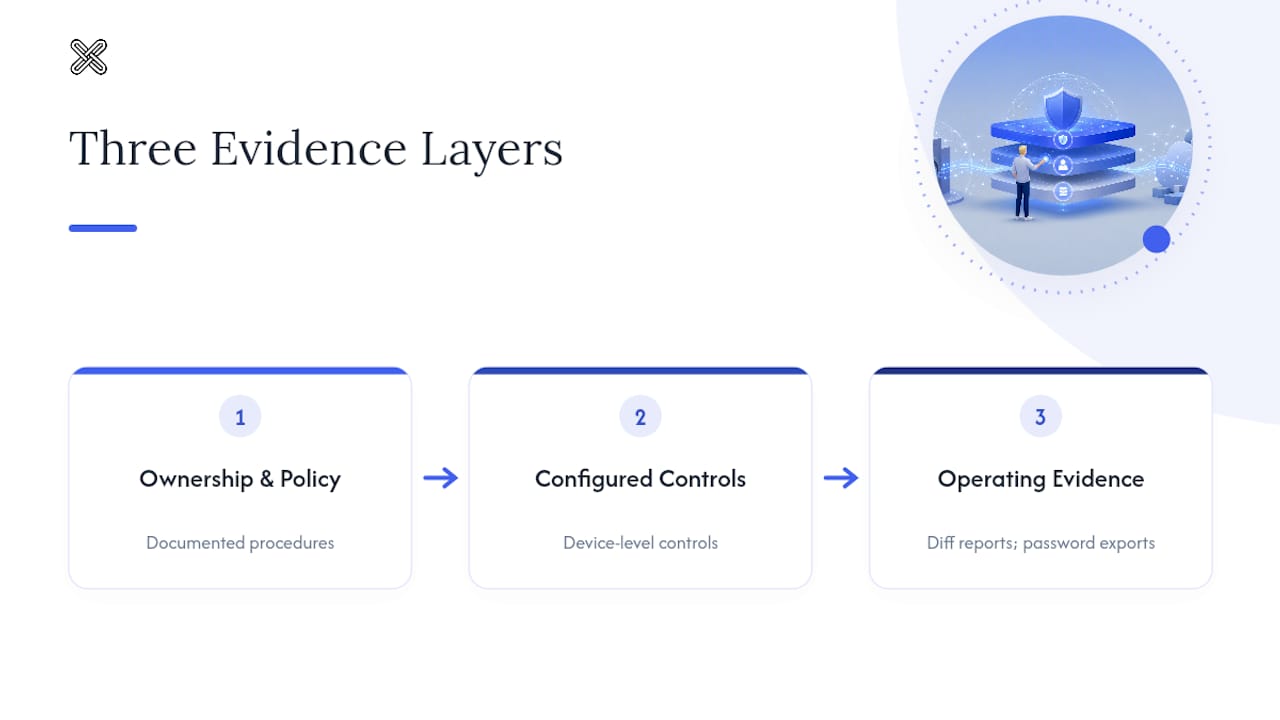
Auditors evaluate document controls against a consistent three-layer model, and understanding it before you start building artifacts will save you weeks. According to soc2auditors.org's documentation guidance, every control needs a policy, a procedure, and evidence that ties directly back to a specific Common Criteria reference.
-
Policy. This is the "what and why." Your information security policy should state the organization's overall commitment to protecting information, and your data classification policy should define categories (public, internal, confidential, restricted) and the handling rules attached to each. Policies get reviewed and approved annually by leadership, and that approval itself needs to be documented, usually a signed sign-off or meeting minutes recording the review.
-
Procedure. This is the "how." Your onboarding and offboarding procedures should specify exactly who provisions document access, what triggers a review, and who signs off before access is granted or revoked. Your access request procedure should define the approval chain for a new team member requesting entry to a sensitive document repository. Your retention and disposal procedure should name an owner and a schedule, not just a general intention to "delete old files eventually."
-
Evidence. This is proof the procedure actually ran. Screenshots of access control configurations, exported logs from your identity provider, signed onboarding and offboarding checklists, change tickets showing an approved document edit, and meeting minutes documenting a quarterly access review all count. soc2auditors.org's guidance lists quarterly access reviews, vulnerability and backup logs, change tickets, and vendor assessment records among the most commonly requested artifacts, and Type II auditors expect this evidence spread across the full observation period, not a single snapshot from audit week.
The mistake teams make most often is treating these three layers as interchangeable. A policy statement is not evidence. A procedure document with no completed instances behind it proves nothing happened. Auditors specifically look for the artifact that shows the procedure executed on a real date with a real outcome, tied back to the control it supports. One internal resource worth reviewing if you're new to this model is this practical guide to document security evidence, which walks through the same policy-procedure-evidence structure in a compliance context adjacent to SOC 2.
Technical Controls That Actually Protect Documents
Policy documents don't protect files. Configuration does. Four technical control areas generate most of the evidence auditors want to see for document security specifically.
Encryption at rest and in transit needs to cover every place a document lives, not just your primary storage. That includes laptops, backup systems, and any staging environment used during file processing. Evidence here usually means configuration screenshots showing encryption enabled, plus key rotation logs proving your key management practice isn't theoretical.
Data loss prevention (DLP) should scope to wherever documents actually travel: cloud file shares, endpoint devices, and outbound email. The evidence auditors want isn't the DLP policy itself, it's the alert history. A DLP rule that's never triggered an alert in six months either means your controls are perfect or, more likely, that the rule isn't actually catching anything. Auditors tend to ask which.
Endpoint and local-first workflows deserve separate attention because they change what evidence looks like. If your document processing happens locally on a device rather than routing through a cloud service, you avoid a whole category of third-party risk, but you still need to document the decision and the compensating controls: device encryption status, endpoint management enrollment, and access logging at the device level. Local processing isn't a shortcut around evidence requirements. It's a different evidence trail.
- Full-disk encryption enabled and centrally verified across endpoints
- DLP alert exports routed to a ticketing system with remediation notes
- Key rotation logs retained for the full observation period
- Backup job success/failure logs, not just configuration screenshots
Backups and tested restores round out this section, and they're a more common gap than teams expect. A backup schedule that runs but has never been test-restored isn't verifiable evidence that your documents are actually recoverable. Auditors increasingly ask for a restore test log alongside backup job history.
Pro Tip: Schedule your first test restore before the observation period starts, not during it. A failed restore test discovered mid-audit is far worse than one caught and fixed three months early.
Teams weighing on-premises versus cloud tradeoffs for document workflows can find more detail in this comparison of on-premise and cloud security models.
Proving Version Control, Retention, and Secure Disposal
Version history is one of the most frequently requested artifacts in a SOC 2 document security review, and it's also one of the easiest to get wrong. Auditors don't want a folder full of "contract_final_v2_ACTUAL.docx" files. They want a canonical source of truth, a change log, and ideally a comparison report showing exactly what changed between versions and who approved it.
That last piece, the comparison report, is where a lot of teams underinvest. Auditors reviewing change management controls specifically want to see the diff between versions when a policy or contract gets updated, not just a timestamp. A document version control guide for compliance teams covers the mechanics of building this kind of inventory in more depth.
Retention and disposal need their own documented schedule, tied to a specific data classification, and exceptions need to be tracked just as carefully as the default rule:
- A retention schedule stating how long each document category is kept and why
- A documented process for legal holds that suspends normal disposal when litigation is pending
- Regulatory holds tracked separately from standard retention, since they often carry different timelines
- Disposal logs showing what was destroyed, when, and under whose authorization
Disposal logs are the artifact auditors ask for most and receive least. Teams frequently have a retention policy and a general belief that "old files get deleted," but no actual log proving disposal happened on schedule. Building that log now, even a simple spreadsheet with dates and approvals, closes one of the more common gaps before it becomes a finding.
Building an Evidence Collection Workflow Before the Audit
Evidence collection works best as a system you build months before fieldwork starts, not a scramble you run the week an auditor asks for something. KPMG's guidance on SOC 2 reporting is blunt about this: preparation consistently takes longer than teams expect, and skipping a readiness assessment is one of the most common reasons audits stall.
-
Run a gap analysis first. Compare your current controls against the Common Criteria you've scoped in and flag anything undocumented or unowned. This step alone often surfaces half your eventual findings before an auditor ever sees them.
-
Automate what you can export. Your identity provider, DLP platform, and backup system can usually generate scheduled exports automatically. Vanta's compliance research points to automated, continuous evidence collection as one of the biggest reductions in audit effort, since it removes the risk of forgetting a manual export mid observation period.
-
Standardize your manual artifacts. Meeting minutes, signed acknowledgments, and access review sign-offs need a consistent template so an auditor isn't parsing five different formats for the same control.
-
Organize by control owner and CC reference, not by department or file type. A folder structure like
CC6.1_AccessControl/2026-Q1/searches faster than one organized by team name, and it maps directly to how auditors request evidence. -
Plan your observation period around report type. Type I evaluates control design at a single point in time. Type II validates that controls operated effectively across a 6 to 12 month window, and most enterprise customers now expect Type II as proof the controls actually function, not just exist on paper. For document controls, that means your access reviews, disposal logs, and change tickets need to show up consistently across every month of that window, not just the final one.
Common Document-Related Audit Findings and How to Fix Them
A handful of gaps show up in document-related SOC 2 findings more than any others, according to Vanta's compliance research, which flags access management and change management as recurring problem areas across audits generally.
- Missed or infrequent access reviews. Teams set a quarterly review cadence and then skip a quarter under deadline pressure. The fix is automating the review export so it's a five-minute sign-off, not a research project.
- Incomplete disposal evidence. A retention policy exists, but nobody logged the actual disposal event. Start a disposal log now, even manually, and automate it later.
- Untracked vendor document handling. Third parties touching sensitive files without a signed data processing agreement or documented access controls is a common gap, especially with cloud-based vendors.
- Untested backups. A backup job that runs successfully but has never been restored isn't verified recoverability, it's an assumption.
Prioritize fixes by audit proximity, not severity alone. If your observation period starts in 60 days, get access reviews and disposal logging running immediately, since those need multiple data points across the window. Vendor agreements and backup testing can follow within the first month without threatening your evidence timeline.
How Local-First Tools Fit Into Document Evidence Collection
Local processing changes what you need to document, but it doesn't remove the documentation requirement. If your document workflows run on local hardware rather than routing through a cloud service, you're eliminating a category of third-party risk auditors often scrutinize closely: subprocessor agreements, cloud vendor security questionnaires, and data residency questions. What you add instead is a need to document the local processing decision itself and the device-level controls that compensate for it.
A tool that performs PDF comparison and document management entirely on local hardware illustrates the pattern. When a document changes, a comparison report showing the exact diff between versions becomes usable evidence for change management controls under CC8, since it proves what changed and when, independent of a cloud audit trail. Password-protected exports similarly generate a concrete artifact showing a confidentiality control was applied to a specific file at a specific point in time.
None of this replaces the policy layer. A comparison report proves a control operated; it doesn't establish that you have an approval procedure requiring review before a contract changes, and auditors will ask about both. Tooling generates evidence faster and cleaner. It doesn't substitute for ownership, a documented procedure, or the judgment your auditor applies when reviewing whether the control actually meets the criterion.
What I'd Prioritize First If I Were Starting From Zero
If you're building document security controls for SOC 2 from scratch, sequence matters more than completeness. Access management comes first, always, because every downstream criterion assumes it works. A confidentiality control built on top of shaky RBAC is a finding waiting to happen.
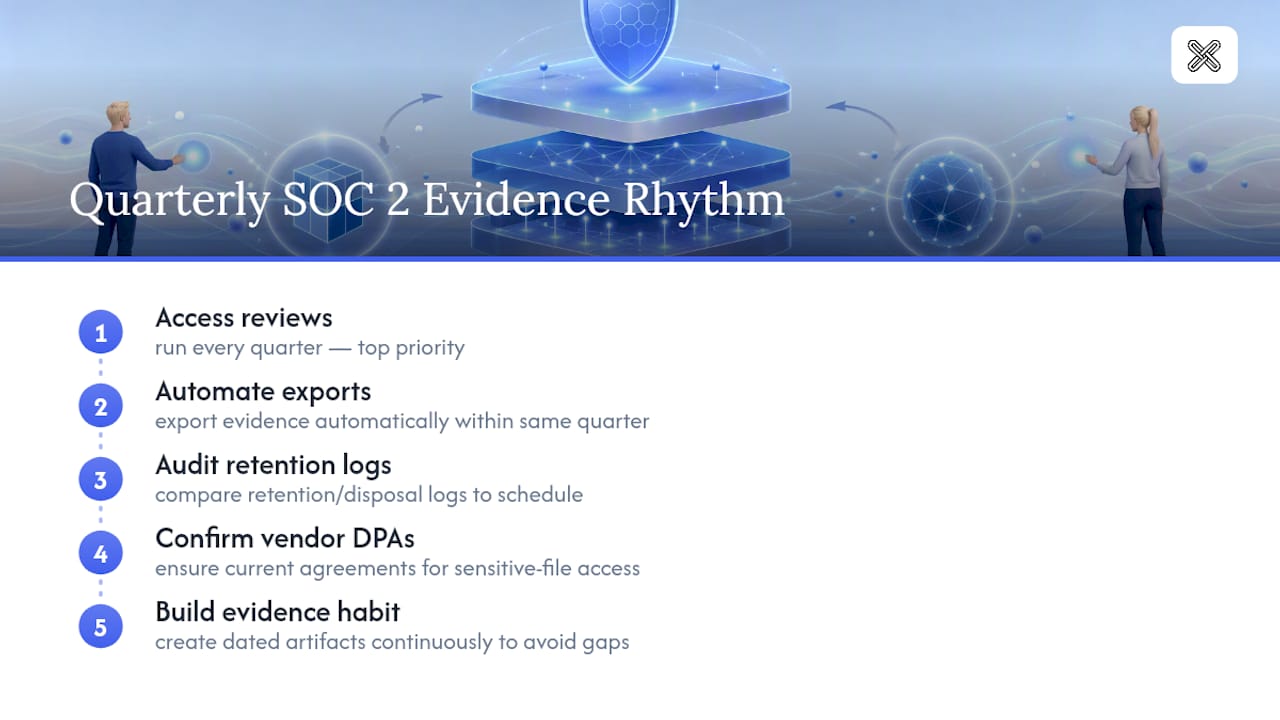
Here's a quarterly rhythm I'd recommend: run access reviews every quarter without exception, automate whatever evidence exports you can that same quarter, audit your retention and disposal logs against the schedule you've actually documented, and confirm vendor data processing agreements are current for anyone touching sensitive files. Miss one of these for a single quarter and you've created a gap in your Type II evidence window that's often impossible to backfill.
The pitfall I see most often isn't a missing control. It's a control that exists and works but has no artifact proving it ran on a specific date. Build the evidence habit before you build anything fancier. Everything else, encryption, DLP, backup testing, matters less if you can't prove the basics operated continuously.
**
Collecting SOC 2 document evidence usually means proving two things: that a file changed under a controlled process, and that sensitive files stayed protected. Some tools handle both without sending documents to the cloud, which matters when your auditor asks how you're limiting third-party exposure for confidential files.
The PDF comparison tool generates a clear diff report between document versions, useful evidence for change management controls under CC8, since it shows exactly what changed and when, all processed locally on your machine. Folder comparison extends that same logic across entire document repositories at once, which helps when an auditor asks for evidence spanning multiple files rather than a single contract. For confidentiality controls, password protection creates a concrete, exportable artifact showing a specific file was locked down before distribution. Because everything runs on local hardware, you avoid documenting a subprocessor relationship for every file comparison and export you generate.
If your team is building an evidence repository ahead of an observation period, start with the full suite of document tools and see which comparison and protection workflows fit your existing control set.
Where to Learn More About SOC 2 Document Requirements
Start with the primary source: the AICPA's SOC 2 reporting information defines the Trust Services Criteria auditors actually use, and it's the normative reference behind every practitioner guide built on top of it.
- Vanta's SOC 2 compliance requirements guide for scoping and automation guidance
- KPMG's SOC 2 reporting whitepaper for readiness assessment practices
- Soc2auditors and documentation breakdown for control-by-control detail
- Lawtonpdf's guide on centralized document administration for evidence ownership models
Sources
- SOC 2 compliance requirements: A comprehensive guide | Vanta
- SOC 2 Controls List (2026): What Auditors Ask For
- KPMG SOC 2 system and organization controls reporting whitepaper
- SOC 2 Documentation: What Your Auditor Actually Requires
FAQ
Is SOC 2 Legally Required?
No federal or state law mandates SOC 2. It's a market requirement: enterprise customers, particularly in finance, healthcare, and legal services, increasingly won't sign a contract without it.
What Is a SOC 2 Document?
A SOC 2 document typically refers to either the final audit report issued by the CPA firm or, in compliance work, the policies, procedures, and evidence artifacts organizations maintain to demonstrate their controls. Both usages are common, so context matters when a customer requests "your SOC 2 document."
How Hard Is It to Get SOC 2 Compliant?
Difficulty depends heavily on scope and existing maturity. A well-prepared team with solid access management can complete a Type I audit in a few months, while a Type II report requires 6 to 12 months of evidence showing controls operated consistently, which is the harder bar to clear.
Who Gives You SOC 2 Compliance?
An independent CPA firm licensed to perform attestation engagements issues the SOC 2 report after auditing your controls against the AICPA Trust Services Criteria. No single vendor or software platform can grant compliance on its own; tools like Lawtonpdf can help generate the evidence artifacts your auditor reviews, but the attestation itself always comes from the CPA firm.