
PCI document security means maintaining a written information security policy under Requirement 12, plus demonstrable artifacts: network and data-flow diagrams, firewall configs, access lists, logs, retention records, and an incident response plan. You then have to secure those documents themselves with encryption, access control, and tamper-evident logging.
That's the whole game. Before you schedule an assessment, confirm you have these in hand:
- A written information security policy, reviewed within the last 12 months
- Current network and data-flow diagrams showing your cardholder data environment (CDE) boundaries
- Firewall and router configuration exports with change-control history
- Access control lists and evidence of periodic entitlement reviews
- Log samples showing monitoring is active, not just configured
- A documented incident response plan that's actually been tested
- Attestations of Compliance (AOCs) from every third-party processor you use
If you're completing a Self-Assessment Questionnaire (SAQ), you'll package a lighter evidence set focused on your specific scope. A Report on Compliance (ROC) demands the full documentary trail, requirement by requirement, since a Qualified Security Assessor validates each control directly against the PCI DSS standard.
Key Takeaways
PCI document security succeeds when Requirement 12's written policy is backed by consistent, encrypted, and access-logged evidence across every one of the 12 requirements.
| Point | Details |
|---|---|
| Requirement 12 anchors everything | Maintain a written information security policy regularly reviewed, with roles and incident response defined. |
| Map documents to each requirement | Match diagrams, configs, and logs to specific requirements (1 through 12) so gaps surface before an assessor finds them. |
| Secure the documents, not just the network | Encrypt policies and logs at rest and in transit, and keep access and version-change logs auditable. |
| Package evidence by SAQ or ROC scope | Build a lighter evidence index for SAQ, a full requirement-by-requirement set for ROC. |
| Process sensitive files locally | Local comparison and protection tools limit uncontrolled cloud copies and shrink CDE scope. |
Table of Contents
- The Required Documentation Every PCI DSS Program Needs
- Which Documents Map to Each of the 12 PCI DSS Requirements?
- What Should Actually Go Inside Each Document?
- Securing the Documents Themselves: Encryption, Access, and Logging
- How Often Should You Review and Update PCI Documentation?
- Building an Evidence Package Auditors Won't Push Back On
- A Local-First Workflow for Producing Audit-Ready Documents
- Where to Find the Official Templates and Checklists
- Why Most PCI Documentation Fails Before the Audit Even Starts
- Sources
- FAQ
The Required Documentation Every PCI DSS Program Needs
Most audit delays trace back to the same handful of missing documents, not exotic technical gaps. Build your library around these:
- Information security policy and its supporting policies — access control, encryption, logging, and vendor management should each have their own documented policy, not just a paragraph buried in a master document.
- Network and data-flow diagrams — these need to show exactly where cardholder data enters, moves, and exits your environment, with CDE boundaries marked clearly.
- Configuration standards and change-control records — every firewall, router, and host device touching the CDE needs a documented baseline and a change history.
- Logging and monitoring procedures with sample logs — a policy that says you log events means nothing without logs proving it happens.
- Asset inventory and third-party AOCs — you need a current list of every system in scope and a signed AOC from each vendor that touches cardholder data.
Practitioner guides like Drata's PCI documentation checklist map these artifacts directly to assessor expectations, which is worth cross-referencing before you assume your file is complete.
Which Documents Map to Each of the 12 PCI DSS Requirements?
Assessors test each of the 12 requirements against specific evidence, not general impressions. Here's the practical mapping, drawn from the PCI DSS Requirements and Testing Procedures:
- Requirement 1 (network security controls): Firewall and router rule-set exports, plus a diagram showing rule justification.
- Requirement 2 (secure configurations): Hardening standards and configuration baselines for every device type.
- Requirements 3 and 4 (protecting stored data and data in transit): Encryption key-management logs, key rotation schedules, and TLS configuration records.
- Requirement 5 (malware protection): Antivirus/anti-malware deployment records and update logs.
- Requirement 6 (secure systems and software): Patch management schedules and vulnerability scan reports.
- Requirement 7 (access restriction): Role-based access matrices tied to job function.
- Requirement 8 (identification and authentication): User provisioning and deprovisioning records, MFA enrollment logs.
- Requirement 9 (physical access): Visitor logs and media handling records.
- Requirement 10 (logging and monitoring): SIEM configuration exports and sample alert tickets.
- Requirement 11 (security testing): Penetration test reports and vulnerability scan history.
- Requirement 12 (policy and organizational controls): The written security policy itself, roles and responsibilities documentation, and your incident response plan.
Where a control isn't fully in place, document it as "in place with remediation" and attach a compensating control worksheet that explains the gap, the interim mitigation, and your remediation timeline. Assessors expect that paper trail, not a verbal explanation during the interview.
What Should Actually Go Inside Each Document?
Vague templates are the reason so many first-time audits stall. Here's what belongs in each artifact:
- Network diagrams: Label every segment, firewall, and CDE boundary; a minimal legend needs device type, IP range, and data classification.
- Data-flow diagrams: Trace cardholder data from capture point to storage to disposal, with encryption status noted at each hop.
- Policy documents: Include an owner, a review date, a defined scope, documented exceptions, and the specific controls enforced.
- Incident reports: Detection timestamp, containment actions, root cause, notification records, and lessons-learned follow-up.
- Retention tables: Document class, retention period, storage location, and disposal method (e.g., cardholder data logs retained 12 months, then cryptographically wiped).
Pro Tip: Keep a single "document index" spreadsheet listing every artifact, its owner, and its last review date. Auditors often ask for this first, and having it ready shaves hours off the interview.
Securing the Documents Themselves: Encryption, Access, and Logging
Documenting your controls is only half the job. The documents describing your CDE are themselves sensitive, and PCI DSS expects you to protect them with the same rigor.
Encrypt policy documents, diagrams, and logs both at rest and in transit, using AES-256 or equivalent for storage and TLS 1.2 or higher for transfer. Auditors want to see key-management logs showing rotation schedules and who holds access to encryption keys, not just a statement that "encryption is used."
Access control evidence matters just as much as the access control itself. Keep access request records, quarterly entitlement reviews, and a separate log of any emergency or break-glass access grants. Cloud security guidance from Google makes the point plainly: access transparency, meaning proof of who touched a document, when, and why, carries as much audit weight as the encryption itself.
Version control closes the loop. Every policy revision should carry a signature or digital hash showing who made the change and when, and immutable logging should flag any attempt to alter a finalized document after the fact. For paper records that still exist in your environment (some legacy retail and healthcare settings still have them), a locked storage log with signed access sheets serves the same evidentiary purpose as a digital audit trail.

How Often Should You Review and Update PCI Documentation?
Documentation goes stale faster than most teams expect. Follow this cadence to keep it defensible:
- Review every policy annually at minimum, and immediately after any significant network or system change, not just on a fixed calendar date.
- Record every review with a reviewer's name, the date, and a short summary of what changed, even if the answer is "no changes needed."
- Apply retention schedules by document class: security logs commonly for 12 months, incident reports and AOCs often for multiple years, with secure disposal evidence (a wipe certificate or shred log) attached to each expired record.
- Track third-party AOC renewals and contract amendments on a rolling basis so an expired vendor attestation doesn't surface for the first time during your own assessment.
Building an Evidence Package Auditors Won't Push Back On
A clean evidence package saves days of back-and-forth. Structure it around these elements:
- A one-page evidence index listing every document, its requirement mapping, and its last update date.
- Diagrams and policies presented as PDFs with version numbers visible in the file itself, not buried in email threads.
- Log samples covering a representative window (typically 90 days) rather than a single day pulled at random.
- Vendor AOCs filed by service provider name, matched against your third-party inventory.
- Compensating control worksheets for anything not fully in place, each with a clear remediation date.
SAQ submissions generally need a lighter version of this package scoped to your specific SAQ type. Even SAQ A merchants, who outsource cardholder data processing entirely, still need vendor AOCs on file. ROC submissions require the complete set, organized to match the assessor's testing sequence.
A Local-First Workflow for Producing Audit-Ready Documents
Every document you generate for a PCI assessment is itself sensitive, and uploading diagrams, configs, and incident reports to cloud tools creates uncontrolled copies that widen your CDE. Processing those files locally instead keeps them off servers you don't control and shrinks your audit scope before an assessor even asks a question.
A practical workflow looks like this:
- Compare two versions of a network diagram or policy document locally and export a dated comparison report showing exactly what changed, using a tool like LawtonPDF's PDF comparison feature.
- Flatten and password-protect signed PDFs before they're stored, so the final version can't be silently edited.
- Log each export with a runbook entry noting the timestamp and user identity, which auditors accept as valid evidence of a document's state at a specific point in time.
- Centralize administration of who can access or export these files, rather than scattering permissions across shared drives.
Pro Tip: A dated, exported comparison report between your current and previous network diagram is one of the fastest ways to prove "change was documented and reviewed" for Requirement 1, and it takes minutes to produce.
Where to Find the Official Templates and Checklists
Start with the source documents instead of a secondhand summary:
- The PCI Security Standards Document Library for SAQ, ROC, and AOC templates.
- The PCI DSS standard for the full requirement text.
- SecurityMetrics' Requirement 12 breakdown for practical policy guidance.
Why Most PCI Documentation Fails Before the Audit Even Starts
The conventional advice treats PCI documentation like a compliance checklist you fill out once and file away. That's backward, and it's the single biggest reason assessments stall. Documentation isn't proof you wrote a policy. It's proof the policy is actually being executed, week after week, by real people who can be traced to real actions.
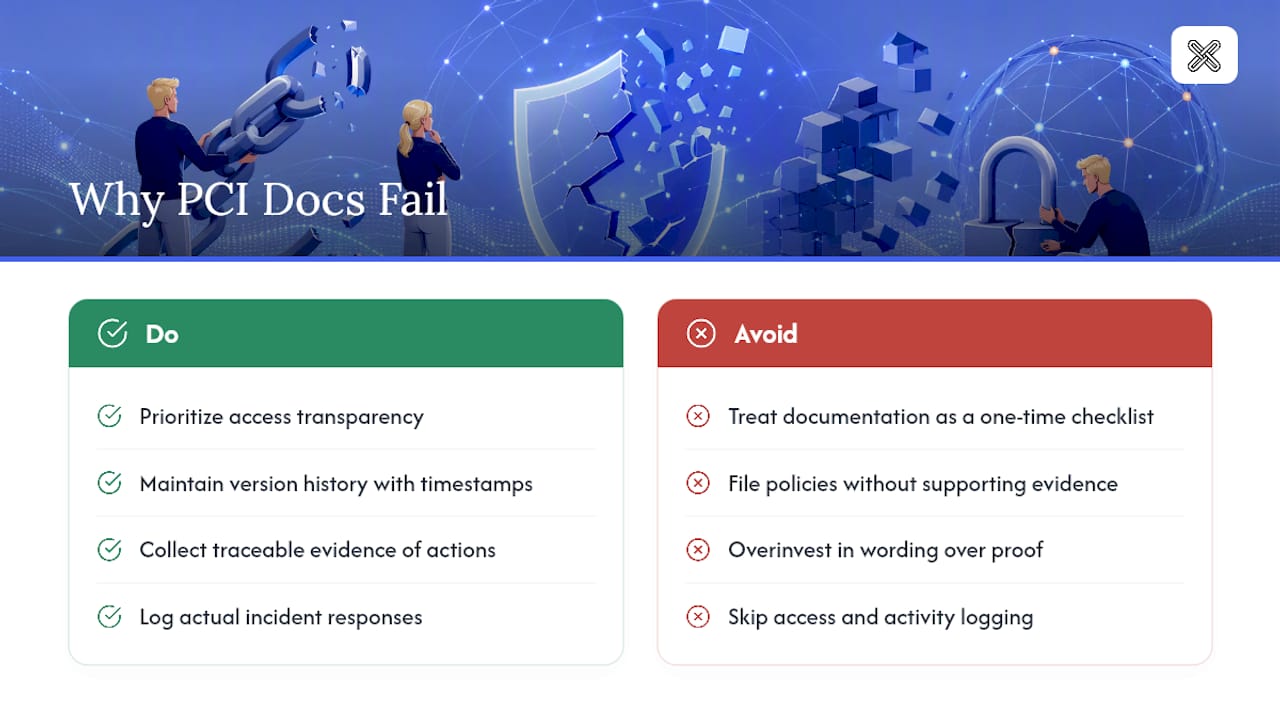
Most teams overinvest in the written policy and underinvest in the evidence trail behind it. A beautifully worded incident response plan means nothing if you can't produce a log showing it was followed during an actual event. The gap between "we have a policy" and "we can prove the policy works" is where audits go sideways, and it's rarely a technical failure. It's a documentation habit failure.
If you take one thing from this guide, prioritize access transparency and version history before you polish your policy language. Auditors have seen a thousand well-written policies. What they haven't always seen is a clean, timestamped trail showing who touched what, and when.
— Lawton
Sources
- PCI Data Security Standard (PCI DSS)
- PCI Security Standards Document Library
- PCI DSS requirement 12: policies and documentation (SecurityMetrics blog)
- PCI-DSS-v4_0_1 (Requirements and Testing Procedures)
FAQ
Can I Do PCI Compliance Myself?
Yes, if you qualify for a Self-Assessment Questionnaire based on your transaction volume and processing method. Larger merchants and service providers typically require a Qualified Security Assessor to complete a Report on Compliance.
Do I Need to Worry About PCI Compliance?
If your business stores, processes, or transmits cardholder data in any capacity, PCI DSS applies to you regardless of company size. Non-compliance risks include fines, increased transaction fees, and loss of card processing privileges.
What Is PCI for Security?
PCI DSS is a set of technical and operational requirements designed to protect cardholder data during storage, processing, and transmission. It applies to any organization that handles payment card information.
What Are the 12 Requirements for PCI Compliance?
The 12 requirements cover network security, secure configurations, data protection, encrypted transmission, malware defense, secure systems, access restriction, authentication, physical security, logging and monitoring, security testing, and a written information security policy under Requirement 12.