
Local-first centralized document administration means running your PDF tools, file comparisons, and license controls entirely on your own hardware, with a central admin layer that manages users without ever routing files through the cloud. For legal, healthcare, finance, research, and technology teams handling sensitive files, this is the model worth adopting. Software like LawtonPDF fits this pattern by keeping every operation on-device.
TL;DR:
- Local processing tools handle OCR, redaction, and document comparison entirely on hardware, preventing raw files from ever reaching external servers.
- Teams must manage updates, backups, and licenses without relying on vendor cloud consoles, requiring more IT involvement and planning.
- A phased approach involves auditing documents, testing workflows, and establishing policies before deploying, ensuring operational reliability.
- Audit trail artifacts include encrypted device logs, chain-of-custody records, and retention enforcement, aligned with privacy and compliance standards.
- LawtonPDF offers on-device PDF comparison, folder verification, and license management, fitting the local-first model for sensitive document handling.
Table of Contents
- What Does Centralized Document Administration Mean Here?
- Why Privacy-Sensitive Teams Choose Local-First Administration
- Core Components of a Local-First Document Stack
- How Do You Roll Out a Local-First System?
- What Controls Do Auditors Actually Expect?
- Keeping the System Reliable Over Time
- How LawtonPDF Fits the Local-First Model
- What I'd Tell a Team Evaluating This
- Try Local-First Document Tools Without the Cloud Trade-Off
- Sources
- FAQ
What Does Centralized Document Administration Mean Here?
Centralized document administration, in the sense that matters for privacy-sensitive teams, is not a cloud dashboard that syncs files across departments. It is on-device software that centralizes tools like merging, redlining, and advanced comparison, alongside team license management, while every byte of processing stays on local hardware.
This model fits teams who cannot risk exposing raw documents to outside servers, even briefly. A litigation team redlining a contract, a hospital compliance officer reviewing patient intake forms, or a research lab comparing versions of a grant proposal all need the same thing: precise tools without a network hop.
Core capabilities you should expect from this kind of stack:
- On-device OCR, redaction, and rendering with no upload step
- Advanced compare across PDF, Word, text, code, spreadsheet, image, and folder formats
- Centralized license and user management for teams, not just individual seats
- Encrypted local storage with access controls tied to specific machines or users
- Audit logging that stays attached to the file, not to a cloud account
Why Privacy-Sensitive Teams Choose Local-First Administration
Data minimization drives most of this decision. Processing documents locally, running OCR, redaction, and summarization on-device, means raw files never touch a third-party server. Research on privacy-first local processing recommends exactly this pattern: scan, parse, and summarize on the device before anything gets transmitted anywhere.
Custody is the second driver. When files never leave the machine, your audit trail is simpler because there's no upload log, no third-party access record, and no vendor breach to monitor. Encrypted local vaults paired with immutable logs give you a chain of custody that lives entirely inside your own infrastructure.
For healthcare teams, this pattern also happens to align well with the kind of evidence auditors expect under HIPAA. Keeping protected health information off external servers removes an entire category of exposure risk before you even get to access controls.
None of this comes free. Trade-offs include:
- IT staff need to manage updates, backups, and licenses without a vendor's cloud console doing it for them
- Offline-first tools mean less real-time collaboration across distant offices
- Full-text search across huge local archives can run slower than a cloud index built for that purpose
Local desktop automation also keeps templates and generated outputs under your control instead of a vendor's servers, according to DocxForge Pro's analysis of desktop versus cloud document workflows.
Core Components of a Local-First Document Stack
Building or evaluating a local-first system comes down to four layers working together.
- Local processing engines. OCR, redaction tools, and file renderers that handle PDF, Word, text, and image formats without a network call. Advanced compare tools belong here too, checking PDF-to-PDF, folder-to-folder, or spreadsheet-to-spreadsheet differences on the machine itself.
- Central administration. Role-based access control, license pools, and policy enforcement that a team lead or IT admin manages from one console, even though the files themselves never leave individual workstations.
- Storage and custody. Encrypted local vaults, scheduled backup snapshots, and hardware-backed key storage (a TPM chip or a hardware security module) that protects encryption keys from casual theft.
- Hybrid-safe patterns. Some teams still want cloud-based search or indexing. The safe version of this keeps only metadata, like file names, tags, and timestamps, in the cloud while binary files and their contents stay local. Any exception to that rule needs explicit sign-off, because hybrid systems only hold up when policy and access controls travel with the file across every boundary it crosses.
Pro Tip: If you're piloting a hybrid pattern, test what happens when a file's classification tag gets stripped during a sync. If your policy can't survive that failure, the pattern isn't ready for sensitive data.
How Do You Roll Out a Local-First System?
A phased rollout catches problems before they become policy failures. Follow this order:
- Audit your documents. Catalog document types, retention requirements, and sensitivity levels across every team that will use the system.
- Choose your architecture. Decide between workstation-based agents, an on-premises server, or a managed local appliance depending on team size and IT capacity.
- Run a pilot. Test local ingestion, OCR, redaction, comparison, and audit logging against a real workflow, not a synthetic sample file.
- Write the policy. Define classification rules, retention periods, exception handling, and who approves any cloud exception before it happens.
- Roll out to production. Handle provisioning, license assignment, user training, backup and disaster recovery setup, and ongoing monitoring together, not as afterthoughts.
Before you sign off on rollout, confirm these operational basics are in place:
- A tested restore process, not just a backup schedule
- Named owners for policy exceptions and audit review
- A training plan for staff who are used to cloud-based tools
- A monitoring routine that flags unusual access patterns early
Offline document management architectures range widely, from a single scanning station connected to a NAS drive to distributed setups with encrypted sync, according to Simplyfile of cloud-free document systems. Pick the architecture that matches your team's actual size, not an aspirational one.
What Controls Do Auditors Actually Expect?
Auditors don't want promises. They want artifacts. At minimum, expect to show disk encryption on every device handling sensitive files, multi-factor authentication for admin access, device posture checks, and hardware-backed key storage rather than keys sitting in a plaintext config file.
Documents carrying embedded personal data create risk the moment they're duplicated across systems, which is why operational risk research on embedded personal data treats derived copies and summaries as sensitive as well, not just the originals. Classification has to follow every version of a file, including the redacted one.
Your audit trail should include:
- Immutable access logs tied to specific files and users
- Chain-of-custody notes for any document that moves between systems
- Retention enforcement records showing files were deleted or archived on schedule
- Approval records for any AI-assisted summarization before content left the local environment
That last point matters more each year. Local-first medical record patterns that run OCR, extraction, and redaction on-device, then send only a governed summary to a cloud AI tool, let teams use AI assistance without exposing raw records, based on local-first processing research for AI privacy. Local-first systems keep evidence attached to the file itself, which makes audits far less painful than reconstructing custody after files crossed a boundary you didn't fully control.
Keeping the System Reliable Over Time
A local-first system is only as good as its maintenance routine. Encrypted backups need a rotation schedule, and restore testing has to happen on a real calendar, not "whenever someone remembers."
Version control matters just as much as backup. Preserve original files untouched, and use PDF/A for long-term archives since it's built specifically to stay readable decades from now, a practice offline document management guides consistently recommend alongside local OCR for searchability.
Day-to-day operations should include:
- A documented incident response playbook for lost devices or failed backups
- Periodic compliance checks against your written retention and classification policy
- Centralized license pools that scale as headcount grows, instead of ad hoc individual purchases
- Distributed capture stations for teams scanning paper records at multiple sites
Pro Tip: Run your restore test on a random file, not the one you always use for demos. That's the file that reveals whether your backup process actually works under real conditions.
Scaling a local-first system usually means adding more capture points and license seats, not rearchitecting the whole system. Selective metadata indexing, where only file names and tags sync to a central search layer, lets a growing team find documents fast without ever centralizing the files themselves.

How LawtonPDF Fits the Local-First Model
LawtonPDF is a Windows application built around this pattern: PDF tools and document comparison that run entirely on local hardware, with no cloud processing step at any point.
The parts of the stack described above map directly onto specific LawtonPDF features:
- Advanced local compare. PDF comparison checks text, layout, and content differences across legal or financial documents without uploading either file.
- Folder-level verification. Folder compare tools handle bulk comparisons across directories, useful for research teams checking dozens of document versions at once.
- PDF management on-device. Merging, splitting, organizing, watermarking, and password protection all run locally, covering the core processing layer a centralized admin stack needs.
- Team and license administration. Centralized license pools let IT manage seats across a legal, finance, or healthcare team without a cloud console holding the keys.
For a deeper look at how these pieces combine into a full administration pattern, the centralized PDF administration guide walks through practical setups for professional services teams.
What I'd Tell a Team Evaluating This
The teams that get local-first right treat it as an operational commitment, not just a software purchase. If your IT staff can't own backup, patching, and license management without a vendor's cloud console doing it for them, you're not ready for this model yet, no matter how good the compliance argument sounds on paper.
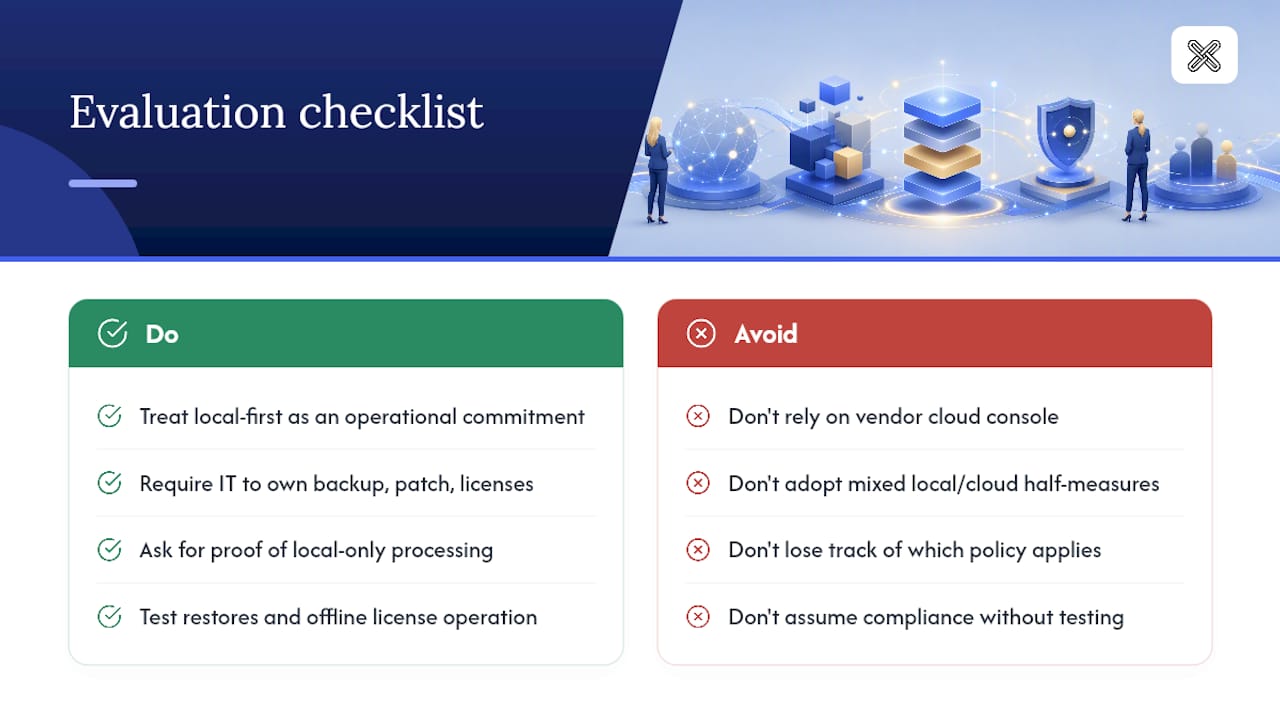
The most common pitfall I see is half-measures: teams adopt local processing for some documents and cloud tools for others, then lose track of which policy applies where. A hybrid approach only survives when classification and access rules travel with the file everywhere it goes.
Before you buy anything, ask for evidence of local-only processing, test the restore process yourself, and confirm license management doesn't require a persistent cloud connection to function.
— Lawton
Try Local-First Document Tools Without the Cloud Trade-Off
If your team is ready to move away from cloud uploads for sensitive files, LawtonPDF gives you a direct path: PDF tools, advanced comparison, and team license management that run entirely on your own machines.
You get local compare for PDFs, Word documents, spreadsheets, images, and entire folders, plus the merging, redaction, and protection tools a centralized admin workflow needs, all without a single file leaving your network. Teams managing multiple users can assign and track licenses centrally while every document stays on local hardware. Explore the full document and PDF processing toolset to see which features fit your workflow, or start with the free PDF tools for Windows to test the local-first approach on a real document before rolling it out to your whole team.
Sources
- Privacy-first local processing recommendations (MDPI)
- Desktop vs Cloud: Why local software is more secure for document automation (DocxForge Pro)
- Cloud compliance and hybrid control gaps (Daida)
FAQ
What Is Local-First Centralized Document Administration?
It's an on-device approach to managing PDF tools, comparisons, and team licenses where all processing happens locally, with no files uploaded to cloud servers.
Is Local-First Document Management HIPAA-Compliant?
Local processing reduces the exposure risk that HIPAA audits scrutinize most, since protected health information never leaves the device, though your organization still needs its own policy, access controls, and audit logging to meet full compliance requirements.
Can Local-First Systems Still Support Team Collaboration?
Yes. Centralized license and user administration lets IT manage teams and permissions without routing the documents themselves through the cloud, though real-time collaboration across distant offices works differently than in cloud-based tools.
What Tools Does LawtonPDF Offer for Centralized Administration?
LawtonPDF provides local PDF comparison, folder comparison, and PDF management tools alongside centralized team license controls, all running on local hardware.
What Happens If I Need Cloud Search Across Local Files?
The safer pattern syncs only metadata, like file names and tags, to a cloud index while keeping the actual documents and their contents on local storage at all times.