
Three methods confirm a file hasn't changed without touching the internet: SHA-256 checksums against a stored manifest, cryptographic signature verification, and content-level comparison for forensic detail hashes can't show. Start immediately by generating a SHA-256 manifest of your baseline files and folders, then saving that manifest somewhere separate from the source. Some document comparison tools handle the document comparison piece entirely on your machine, with no uploads required.
TL;DR:
- Using SHA-256 checksums with a stored manifest provides reliable detection of any tiny file modifications, but does not verify the file’s authenticity or origin.
- Digital signatures confirm who created a file and that it is trustworthy, while combining content-level comparisons can reveal hidden edits and metadata changes that hashes alone miss.
- Verifying folders recursively with tools like FolderManifest enables efficient integrity checks across entire directory trees, producing nonzero exit codes for any discrepancies.
- Building an audit-ready workflow involves regularly updating separate, encrypted baselines and storing proof in independent locations to satisfy regulatory requirements.
- Offline verification is best performed with local tools and commands, avoiding cloud dependencies and ensuring full control over document integrity proofs.
Table of Contents
- Quick Checklist: What To Do Now To Verify Documents Offline
- Core Offline Methods Explained: Checksums, Signatures, and Content Comparison
- Practical Offline Tools and Commands for Windows and Linux Teams
- Building an Audit-Ready Workflow: Baseline, Cadence, and Evidence Packaging
- Troubleshooting Mismatches and Investigating Suspected Tampering
- Documenting Results for Audit or Legal Review
- Using Hardware Security Modules or USB Security Tokens Offline
- Best Practices for Securing Baseline Checksum Databases Offline
- Automating File Integrity Verification With Scripting
- Handling Large Datasets: Performance in Offline Verification
- Why Offline Verification Matters More Than the Convenience of the Cloud
- Verify Documents Offline With LawtonPDF's Local Comparison Tools
- Sources
- FAQ
Quick Checklist: What To Do Now To Verify Documents Offline
Before you dig into theory, run through this sequence. It takes most teams under 30 minutes and gives you a defensible starting point if questions come up later.
- Generate a baseline manifest. Run a SHA-256 hash across every critical file and folder, then export it as a manifest file.
- Store the manifest off the source system. A USB drive, a separate server, or write-protected media all work. If the manifest sits next to the files it's supposed to verify, an attacker who alters one can alter the other.
- Check for digital signatures first. If a vendor or internal system signed the file, verify that signature before you even look at checksums. Signatures confirm origin; checksums alone don't.
- Run recursive folder verification. Point a folder-level tool at the directory tree and capture both the exit code and the generated report.
- Snapshot metadata. File size, creation and modification timestamps, and any embedded metadata should be exported alongside the hash manifest.
- Log the operator and timestamp for every step. Auditors care as much about who ran verification and when as they do about the result itself.
Pro Tip: Keep your baseline manifest and your verification manifest in separate files, even when they match. A single overwritten file destroys your ability to prove nothing changed between the two checks.
Core Offline Methods Explained: Checksums, Signatures, and Content Comparison
SHA-256 detects any bit-level change to a file, no matter how small. Flip a single bit anywhere in a 500-page PDF and the resulting hash looks nothing like the original. That's why it has replaced MD5 and SHA-1 for tamper detection: both older algorithms have known collision weaknesses that let two different files produce the same hash, which defeats the entire point of integrity checking.
Checksums and signatures answer different questions, though, and conflating them is where a lot of verification programs go wrong.
- Checksums (SHA-256) prove a file matches a known-good baseline. They say nothing about who created the file or whether it should be trusted.
- Digital signatures prove authenticity and integrity together, since only the holder of a private key could have produced a valid signature over that content. Offline verification typically uses a stored public key or key file, following the same pattern tools like cosign use for verify-blob operations against a bundled signature.
- Content comparison catches what hashes miss entirely. A PDF can carry incremental saves, hidden prior revisions, or metadata inconsistencies that don't necessarily change the visible page content but do change the file's history.
That third category deserves attention most guides skip. A hash mismatch tells you that something changed; it never tells you what changed or why. Combining a signed manifest with a content-level diff gives you both facts and context, which matters enormously once a document ends up in front of an auditor or opposing counsel. Practical guidance from TechTarget backs this layered approach: generate a baseline, compare metadata, and confirm content, rather than trusting a single check in isolation.
Practical Offline Tools and Commands for Windows and Linux Teams
Air-gapped systems need commands that work without a network call home. Here's what to run on each platform.
On Linux, sha256sum handles both generation and verification:
sha256sum *.pdf > baseline.sha256generates hashes for every PDF in a directory.sha256sum -c baseline.sha256verifies files against that manifest and reports OK or FAILED per file.qpdf --decrypt --qdf input.pdf output.pdfnormalizes a PDF's internal structure, useful before comparing two versions that might differ only in compression.
On Windows, three tools cover the same ground:
certutil -hashfile document.pdf SHA256produces a one-off hash from the command line.- PowerShell's
Get-FileHash -Algorithm SHA256 -Path document.pdfdoes the same with easier scripting integration. - Sigcheck inspects both hashes and digital signature details, with flags for hash display (
-h), CSV output (-c), and signature inspection (-i) built specifically for offline review workflows.
| Task | Linux command | Windows equivalent |
|---|---|---|
| Generate SHA-256 hash | sha256sum file.pdf | certutil -hashfile file.pdf SHA256 |
| Verify against manifest | sha256sum -c baseline.sha256 | Get-FileHash + manual comparison |
| Inspect signature | openssl verification chain | sigcheck -i file.exe |
| Normalize PDF structure | qpdf --qdf | N/A (use PDF-specific tooling) |
For whole folders, FolderManifest's CLI generates a JSON or HTML manifest with a single command, then verifies a folder against it later, exiting with code 1 whenever a difference turns up. That exit code matters more than it sounds. It's what lets you wire folder verification into a scheduled task without a human watching the screen.
Building an Audit-Ready Workflow: Baseline, Cadence, and Evidence Packaging
A one-time checksum alone is insufficient evidence for an auditor months later. What matters is a repeatable workflow that produces evidence on its own.
- Build an evidence pack. Bundle the baseline SHA-256 manifest, the public key used for signature verification, the signed manifest itself, and a short readme listing every tool version and command used to generate it.
- Set a verification cadence based on criticality. Run a full manifest after significant events like migrations or backups. For lower-risk data, sample-based or incremental verification between full runs can often suffice.
- Package proofs for air-gapped review. Include the public key files and, where your workflow uses them, pre-fetched transparency proofs, so a reviewer with zero network access can still complete verification. The Stella Ops offline verification model documents this pattern across four escalating levels, from a basic checksum up through provenance data and transparency proofs.
- Separate custody of the proof from custody of the source. The person who controls the original files should not be the same person who controls the baseline manifest.
Pro Tip: Store your evidence pack's checksum in a second, independent location, like a separate department's archive. If someone ever questions whether the pack itself was altered, you'll have something to check it against.
That separation of duties, more than any single tool, is what convinces a skeptical auditor the process wasn't just theater.
Troubleshooting Mismatches and Investigating Suspected Tampering
A checksum mismatch is a starting point for investigation, not a verdict.
- Contain first. Isolate the affected copy, compute a fresh hash on it, and preserve the original media and any transfer logs untouched.
- Reproduce the transfer. Re-download or re-copy the file from an alternate mirror or a different piece of media, then check whether the new copy matches the baseline. Stella Ops recommends exactly this sequence: confirm the transfer completed, check the file size, and try an alternate source before assuming tampering.
- Check the signature chain separately. A corrupted public key file produces a failure that looks identical to a genuine tampering event.
- Run PDF forensic checks when the file is a document. Tools like PDFRecon inspect more than 40 indicators, including multiple xref tables, mismatched font subsets, and XMP revision history, any of which can reveal an edit made after signing.
- Escalate to IT for disk imaging when the stakes are high. Legal holds and regulatory incidents call for a forensic image before anyone touches the original file again.
Documenting Results for Audit or Legal Review
A verification report only holds up if it stands on its own, independent of whoever produced it. Include the baseline manifest, the verification manifest, raw command outputs, tool versions, exit codes, and the operator's identity with a timestamp for every check performed.
Store that evidence somewhere genuinely separate from the source system, ideally write-protected media or a dedicated evidence repository nobody uses for day-to-day file access. Co-locating proof with the files it verifies defeats the purpose entirely.
Recording an independent hash of the manifest itself, kept somewhere outside the producing system, gives a third party a way to confirm the record hasn't been altered after the fact without relying on that system's own logs. For teams under HIPAA, SOX, or 21 CFR Part 11, this kind of independent verifiability is increasingly what regulators expect, not just what's convenient. A closer look at 21 CFR Part 11 compliance requirements shows how electronic-record rules already assume this level of separation between records and the systems that created them.
Using Hardware Security Modules or USB Security Tokens Offline
A hardware security module, or a simpler USB security token, keeps the private signing key off the general-purpose computer entirely. That distinction matters more than it sounds like it should. Software-based keys sit in files that can be copied, backed up accidentally, or exfiltrated by malware without anyone noticing. A hardware token requires physical possession and typically a PIN before it will sign anything, which means a compromised laptop still can't forge a valid signature on its own.
For offline verification specifically, the token's role is usually on the signing side rather than the verification side. Someone generates a baseline manifest, then signs it using a private key stored on the HSM or token, and that signing operation happens without ever exposing the raw key material to the operating system. Verification later only needs the corresponding public key, which can be freely copied and distributed because it can't be used to create a fake signature, only confirm a real one.
Legal and healthcare organizations tend to reach for HSMs when a document's authenticity carries real regulatory weight, like signed audit trails or clinical trial records. Smaller teams often get most of the same protection from a USB token costing a fraction of an enterprise HSM. Either way, the key principle holds: the device that verifies a signature should never be the same device that could have forged one, and the signing key should never live somewhere it could be copied without physical access to the hardware.
Best Practices for Securing Baseline Checksum Databases Offline
Your baseline manifest is only as trustworthy as its own protection. If an attacker can modify both the source file and the manifest that's supposed to catch the change, the whole verification scheme collapses.
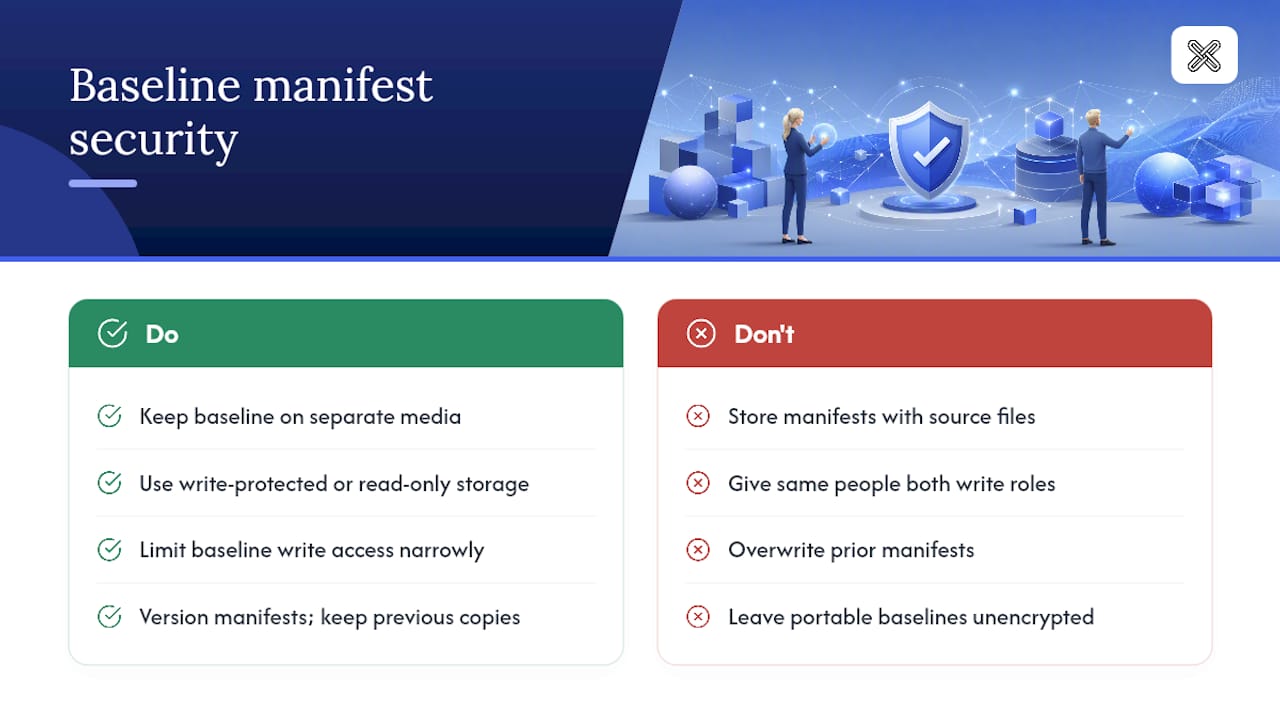
Keep the baseline on separate media from the files it verifies, full stop. A network share that hosts both the documents and their checksum manifest gives anyone with write access to that share the ability to alter both together. Write-protected drives, offline archival media, or a dedicated read-only repository all break that link.
Restrict write access to the baseline database itself to as few people as practically possible, and make sure that list doesn't fully overlap with the people who have write access to the source files. This is the separation-of-duties principle again, applied specifically to the database rather than the broader workflow.
Version your baselines rather than overwriting them. Every time you regenerate a manifest, whether after a migration, a scheduled cadence, or an incident, keep the prior version rather than replacing it in place. A dated series of manifests lets you pinpoint roughly when a discrepancy first appeared, which narrows an investigation considerably compared to a single always-current file.
Encrypt the baseline database at rest if it lives on portable media, and keep a record of exactly who has access to the decryption key. A stolen USB drive containing an unencrypted checksum database hands an attacker a roadmap of exactly which files to target and what hash they need to fake.
Automating File Integrity Verification With Scripting
Manual verification doesn't scale past a handful of files, and manual processes are exactly where audit gaps creep in. A short script, run on a schedule, closes that gap without requiring anyone to remember to check.
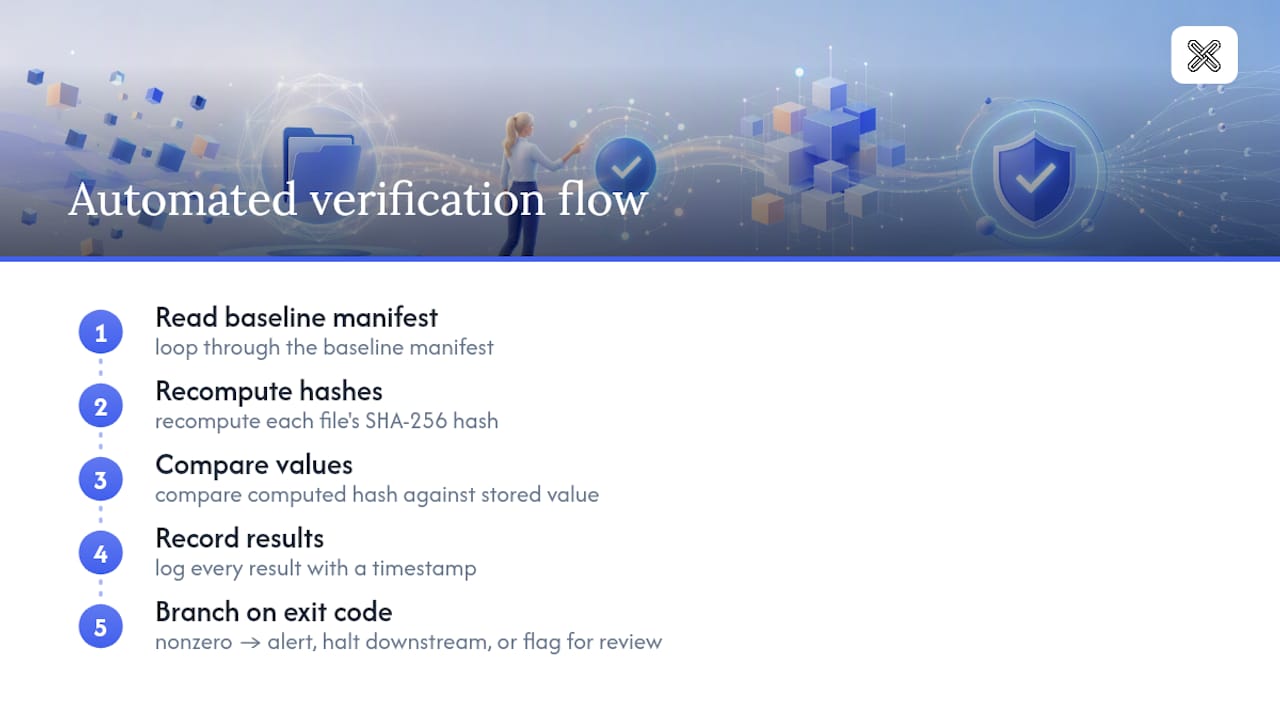
A basic Linux verification script needs only a few lines: loop through the baseline manifest, recompute each file's SHA-256 hash, compare it against the stored value, and log every result with a timestamp. Wrapping sha256sum -c baseline.sha256 in a cron job, with output redirected to a dated log file, gets most teams 90 percent of the way there without custom code.
The part worth building carefully is the exit-code handling. sha256sum -c and tools like FolderManifest's verify command return nonzero exit codes when a mismatch occurs, and a script that checks for that exit code can trigger an alert, halt a downstream process, or flag a file for manual review automatically. That's the difference between a script that just runs and one that actually protects anything.
On Windows, PowerShell's Get-FileHash slots into a scheduled task the same way, comparing computed hashes against a stored CSV or JSON baseline and writing results to an event log or a flat file for later review. Either platform benefits from keeping the script itself under version control, since a script that silently fails to run is just as dangerous as a manifest nobody checks.
Handling Large Datasets: Performance in Offline Verification
Hashing a few dozen PDFs takes seconds. Hashing a research archive with hundreds of thousands of files, or a multi-terabyte backup set, is a different problem entirely, and the naive approach of hashing everything sequentially every time will eventually become the bottleneck in your compliance process.
Parallelization is the first lever. Splitting a large file set across multiple CPU cores, either through a scripting language's built-in parallel processing or a tool designed for it, cuts wall-clock verification time roughly in proportion to the number of cores available, since SHA-256 hashing is CPU-bound rather than disk-bound on modern hardware.
Incremental verification is the second, and often more important, lever. Rather than re-hashing an entire dataset on every cadence cycle, track file modification timestamps and only re-verify files that have changed since the last full run. This works well between full baseline refreshes, though it does mean a full manifest regeneration periodically to catch anything that changed timestamps without changing content, or vice versa.
Storage medium matters more than most teams expect. Hashing directly off a slow external drive or a network share with high latency can dominate total runtime far more than the hashing algorithm itself. For genuinely large datasets, copying to fast local storage before running verification, then archiving the results, often outperforms running checks in place.
Why Offline Verification Matters More Than the Convenience of the Cloud
Cloud-based integrity tools are convenient right up until the moment a client or regulator asks whether a sensitive document ever left your control. For legal, healthcare, and finance teams, that question isn't hypothetical. The safest answer is the one where the file, the hash, and the comparison never touched a server you don't own. Reproducible commands like sha256sum -c matter because anyone can rerun them and get the same answer, which is the entire point of a defensible verification workflow.
— Lawton
Verify Documents Offline With LawtonPDF's Local Comparison Tools
Some software solutions are built around the exact constraint this guide keeps circling back to: verification that never sends a file anywhere. Every comparison, whether it's PDFs, Word documents, spreadsheets, images, or entire folders, runs locally on your machine, so the manifests and evidence packs you generate stay fully under your control from start to finish.
For teams that need more than a checksum, LawtonPDF's PDF and document comparison tools surface content-level differences a hash alone would never catch, then let you export results for an audit trail. Centralized license administration can make it practical to roll the same workflow out across an entire legal, finance, or healthcare team while maintaining local-only processing for each user. If your evidence packaging process already leans on folder-level manifests, pairing that with LawtonPDF's full toolset covers the comparison side without adding a cloud dependency anywhere in the chain. Start with a trial run on your next document set and see what a local-only comparison actually catches.
Sources
- Sigcheck download and documentation — Microsoft Learn
- Stella Ops — Offline verification guide
- How to check and verify file integrity — TechTarget
- PDFRecon README — GitHub
- FolderManifest CLI documentation
FAQ
What Is the Best Way to Verify File Integrity Offline?
Generate a SHA-256 manifest of your baseline files, verify any available digital signature, and run a content-level comparison for documents like PDFs where hashes alone won't reveal hidden edits.
Why Is SHA-256 Preferred Over MD5 for Checksums?
MD5 and SHA-1 both have known collision vulnerabilities that let two different files produce the same hash, while SHA-256 has no practical collision method, making it far more reliable for tamper detection.
Can I Verify a Folder Instead of Individual Files?
Yes. Tools like FolderManifest generate a manifest for an entire folder tree and verify it later with a single command, exiting with a nonzero code whenever a file has changed.
What Should I Do If a Checksum Doesn't Match?
Isolate the file, recompute the hash on a fresh copy, and try re-transferring from an alternate source before assuming tampering, since a corrupted transfer often looks identical to intentional alteration.
Does LawtonPDF Verify File Integrity Offline?
Some tools perform all PDF, document, and folder comparisons locally on your machine, with no uploads, which makes them practical companions for teams building offline evidence packages alongside checksum and signature verification.
Do I Need a Hardware Token for Basic Offline Verification?
Not for most routine checks. A hardware security module or USB token becomes worthwhile when a document's authenticity carries real legal or regulatory weight, since it keeps the signing key from ever touching the general-purpose computer.