
Start a continuous license-management loop today. Build one authoritative inventory, map your entitlements, and schedule your first internal audit this quarter. That three-step foundation, aligned with the ISO/IEC 19770 software asset management standard, is what separates teams that pass vendor audits from teams that scramble through them. Lawtonpdf is built for exactly this kind of local-first, privacy-conscious workflow.
Your minimum starting checklist:
- Create a single inventory of every installed copy, device, and assigned user
- Map each title to its license metric (per-user, per-device, concurrent) and contract terms
- Schedule your first internal audit soon
Table of Contents
- What are the core software license management best practices?
- How do you build a single authoritative inventory and entitlement map?
- What does the discovery-to-reclamation cycle look like in practice?
- How do you build a policy that stops shadow IT?
- What evidence do you need to survive a vendor audit?
- Which tooling features matter most for local-first teams?
- Your 30/60/90-day plan to get the program running
- Key Takeaways
- Why local-first matters more than most guides admit
- Lawtonpdf keeps your license evidence on your hardware
- Useful sources
- FAQ
What are the core software license management best practices?
Effective license management has three goals: stay compliant, cut shelfware, and make software spend predictable. Most teams treat audits as a once-a-year fire drill. That approach leaves money on the table and creates real compliance risk between cycles.
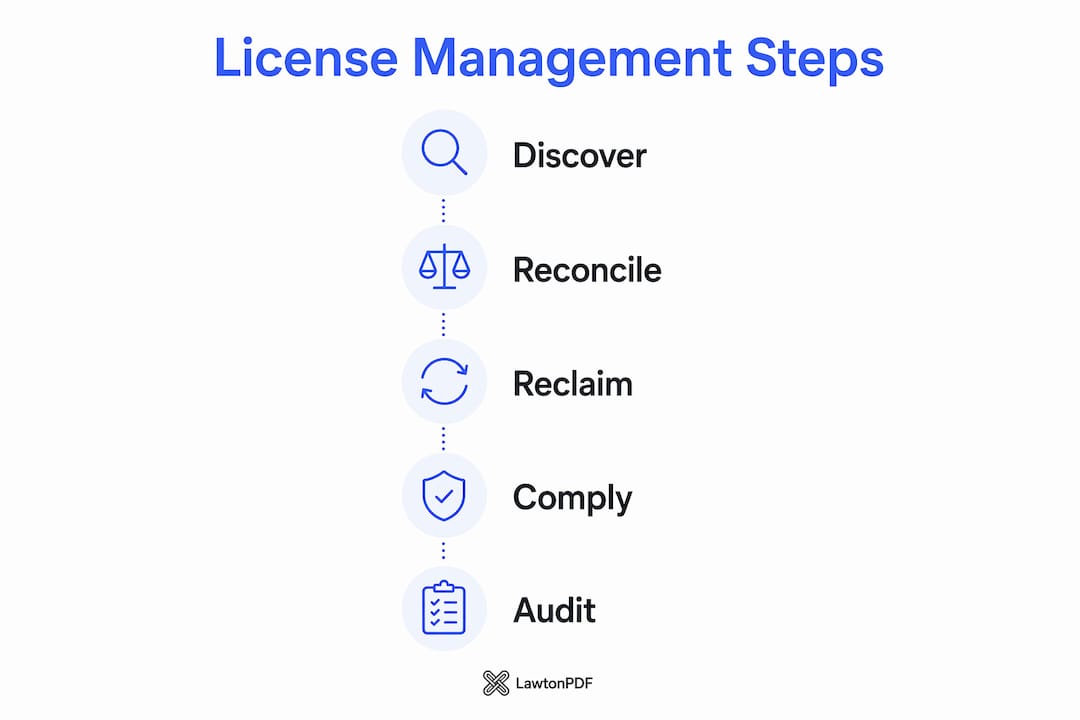
The better model is a continuous loop: discovery, reconciliation, reclamation. You discover what is installed, reconcile it against what you are entitled to, and reclaim or reassign anything unused. Repeat quarterly, not annually.
Three trust signals separate programs that work from ones that stall:
- A documented policy with named owners across IT, finance, and procurement
- Cross-functional sponsorship so license decisions have budget authority
- KPIs tracked from day one: utilization rate, reclaimable licenses, cost per active user
Pro Tip: Treat license management as a defensible budget line. When you can show finance exactly how many seats are unused and what reclaiming them saves, the program funds itself.
How do you build a single authoritative inventory and entitlement map?
Your inventory is your single source of truth. Without it, reconciliation is guesswork. Capture these fields for every title:
- Software title (normalized name, no variant spellings)
- Version and edition
- Install count and device ID
- Assigned user
- License metric (per-user, per-device, concurrent, CPU/core)
- Contract or purchase order number
- Expiration date
- Assignment history
- Proof file links (invoice, activation key, receipt)
Sample inventory row:
| Field | Example value |
|---|---|
| Software title | LawtonPDF Business |
| Device ID | WIN-DESK |
| Assigned user | j.smith@company.com |
| License metric | Per-user |
| PO number | PO-0118 |
| Expiration | December 31 |
| Proof file | /evidence/lawtonpdf-invoice.pdf |
For local-first environments, add two extra fields: offline device flag (yes/no) and local license key storage location. Automated discovery tools often miss machines that are disconnected from the network, so offline devices need a manual check-in process. Store product use rights documentation alongside each record, not in a separate folder that gets lost at renewal time.

What does the discovery-to-reclamation cycle look like in practice?
Run discovery continuously, reconcile regularly, and perform full internal entitlement audits periodically. Quarterly audits are a strong starting cadence for comparing installed software against entitlements and catching unused licenses before they roll over.
Quarterly reconciliation checklist:
- Export your current install count from your discovery tool or manual log
- Pull your entitlement count from the inventory (licenses purchased minus expired)
- Flag every title where installs exceed entitlements (over-licensed risk) or fall short by more than 20% (reclamation candidate)
- Map dependencies for any seat you plan to reclaim: confirm no downstream service or workflow relies on that installation
- Propose reclamation, reassignment, or downgrade for flagged titles
- Document every decision with a date, owner, and outcome
Safe reclamation requires dependency mapping first. Removing a license without checking dependencies can break a business process that relies on that software. Confirm the impact, communicate the change, then act.
How do you build a policy that stops shadow IT?
Documented policy and clear ownership are the two highest-leverage items for preventing license sprawl. A policy without a named owner is just a document nobody reads.
Sample policy outline:
- Procurement approval flow: all new software requests routed through IT before purchase
- Allowed/forbidden software list: maintained and reviewed quarterly
- Renewal triggers: 90-day advance notice to license owner and finance
- Deprovision triggers: employee offboarding checklist includes license reclamation within 24 hours
- Exception process: trial licenses approved for 30 days maximum; developer licenses require IT sign-off
Roles and responsibilities:
| Role | Responsibility |
|---|---|
| License owner | Accountable for compliance and budget for each title |
| License steward | Day-to-day tracking, reconciliation, and assignment updates |
| Procurement contact | Manages vendor contracts and renewal negotiations |
| Finance approver | Authorizes spend and reallocates reclaimed budget |
| End user | Installs only approved software; reports issues to steward |
Full employee participation beyond IT is what actually reduces unauthorized installations. Announce the policy, run a short training session, and embed license checks into your onboarding and offboarding checklists. Change management does not need to be elaborate: a one-page summary and a 15-minute walkthrough cover most teams.
What evidence do you need to survive a vendor audit?
Keep installation logs, purchase records, and assignment history. Reconcile them into a single audit packet before a vendor ever asks. Producing that packet in under an hour is the goal.
Evidence checklist:
- Purchase orders and invoices for every title
- Activation keys stored securely (encrypted, access-controlled)
- Assignment logs showing who holds each seat and since when
- Install logs with timestamps
- Version records for each device
- Change history: upgrades, downgrades, reassignments, reclamations
When a vendor requests an audit, designate one responder, provide the audit packet, and ask for written clarification on scope before sharing anything. If your vendor contracts include non-English terms, a specialist legal translator can help you interpret obligations accurately before you respond.
Audit packet assembly (numbered steps):
- Export the current inventory snapshot from your SAM tool or spreadsheet
- Attach proof files (invoices, POs, activation records) for each title in scope
- Include the assignment log showing current and historical seat holders
- Add the reconciliation report from your most recent quarterly audit
- Label and date the packet; store a copy in your evidence archive
Which tooling features matter most for local-first teams?
Automate discovery, usage metering, and renewal alerts first. Leave exception handling and reclamation decisions to humans. Automation shifts teams from reactive remediation to proactive governance.
When evaluating tools for a local, privacy-sensitive environment, check for:
- Local discovery agent (not network-scan-only) to cover offline devices
- Concurrent and per-user license metric support
- Exportable audit reports in a portable format
- Encrypted local storage for license keys and proof files
- No cloud telemetry or off-device data transmission
- API or HR system integration for automated onboarding/offboarding
Pro Tip: Prioritize tools that connect to your HR or procurement system. Automating the offboarding trigger alone can recover a meaningful number of seats every quarter without any manual follow-up.
For data protection in regulated industries, local-only processing is not optional. Every piece of evidence you generate, every comparison you run, and every audit packet you export should stay on your hardware.
Your 30/60/90-day plan to get the program running
A phased rollout makes the program manageable and measurable from day one.
30/60/90-day checklist:
- Days 1–30: Build your inventory. Document every installed title, device, and user. Establish baseline KPIs: utilization rate, total seats, and cost per active user.
- Days 31–60: Map entitlements to each title. Assign a license owner and steward. Run your first reconciliation and flag over- and under-licensed titles.
- Days 61–90: Perform your first quarterly internal audit. Begin safe reclamation for confirmed candidates. Present findings to finance and reallocate reclaimed budget.
KPIs to track from day one:
- License utilization rate (active users divided by total seats)
- Reclaimable licenses (seats unused for 30-plus days)
- Compliance rate (titles with full entitlement coverage)
- Cost per active user
- Time to produce an audit packet
Schedule a stakeholder check-in at the 30-day and 90-day marks. Finance needs to see the reclamation numbers to approve budget reallocation. IT needs sign-off to proceed with deprovisions. Build both into your calendar before you start.
Key Takeaways
Effective license management requires a continuous loop of discovery, reconciliation, and reclamation, anchored by a single authoritative inventory and quarterly internal audits.
| Point | Details |
|---|---|
| Build one inventory | Capture software title, device ID, user, license metric, contract, and proof files in a single record. |
| Audit quarterly | Compare installs against entitlements every quarter; quarterly cadence is the recommended starting point. |
| Map before reclaiming | Check service dependencies before removing any seat to avoid breaking downstream workflows. |
| Document policy and ownership | Assign a named license owner and steward for every title; embed checks in onboarding and offboarding. |
| Lawtonpdf for local-first teams | Lawtonpdf processes documents and evidence locally on Windows, keeping license keys and audit packets on-device. |
Why local-first matters more than most guides admit
Most license management guides assume cloud-connected infrastructure. For teams running local document-management software on Windows workstations, that assumption creates real gaps. Cloud-based SAM tools often transmit usage telemetry off-device, which means your license keys, document metadata, and assignment history may leave your network without you realizing it.
Local-first processing limits that exposure. When your discovery, comparison, and evidence export all run on-device, you control what leaves your environment. For regulated teams, that is not a preference. It is a governance requirement. The guidance in this article, from encrypted evidence packets to offline device handling, is designed around that reality.
Lawtonpdf keeps your license evidence on your hardware
Teams that follow this guide generate a lot of sensitive files: audit packets, assignment logs, comparison reports, and proof documents. Lawtonpdf is built to handle all of it without sending a single file to the cloud.
Lawtonpdf runs entirely on your Windows machine. You can compare license documents, merge audit evidence, protect files with passwords, and export organized packets, all locally. The admin controls let you assign and manage user seats directly, which fits the ownership model this guide recommends. For teams in regulated environments, the local-only architecture means your evidence stays where your policy says it should.
Try the free PDF tools to start building your audit packet today, or explore the full product to see how license assignment and document management work together on-device.
Useful sources
- BetterCloud: Software license management guide — audit cadence reference and automation priorities
- Virima: Complete guide to software license management — continuous loop model and reclamation dependency guidance
- Device42: Software license management best practices — cross-functional KPIs and policy alignment
- OpenLM: Software license management best practices — employee participation and underutilization root-cause analysis
- USU: 8 best practices for software license management — offline device discovery guidance
- GT Computing: 10 actionable best practices — centralized repository and audit readiness
FAQ
What is the recommended cadence for internal license audits?
Quarterly internal audits are a strong starting cadence. Run automated discovery continuously, reconcile inventories regularly, and perform entitlement audits every quarter.
What records do you need to produce an audit packet quickly?
Keep purchase orders, invoices, activation keys, assignment logs, install logs, version records, and a reconciliation report. Organizing these in advance means you can produce a complete audit packet in under an hour.
How does Lawtonpdf support license management for local Windows teams?
Lawtonpdf processes all documents locally on your Windows machine, so audit packets, license comparisons, and proof files never leave your device. Admin controls let you assign and manage user seats directly within the application.
What KPIs should you track from the start of a license program?
Track key performance indicators such as license utilization, reclaimable licenses, compliance, and cost effectiveness. Perform regular reviews of utilization rate and reclaimable licenses.
Why does dependency mapping matter before reclaiming a license?
Removing a seat without checking dependencies can break a downstream service or workflow that relies on that software. Map every dependency first, confirm the impact, then proceed with reclamation.