
On-premise software is capital heavy in year one and settles into a predictable operating cost after that, with a break-even point against cloud alternatives that typically lands somewhere between two and five years depending on scale. Small deployments often see combined first-year CapEx and OpEx in a range that varies considerably based on configuration and usage. Mid-market environments can incur costs influenced by redundancy needs, resulting in a wide cost range. Enterprise footprints can reach high total costs once staffing, disaster recovery, and refresh cycles are considered.
The math favors on-premise when your workload is steady, high-volume, and predictable, especially if you already own depreciated hardware. It favors cloud when demand is spiky or your team lacks the internal capacity to manage patching, backups, and hardware failures. For document-heavy operations specifically, tools like LawtonPDF show how a local-first approach to PDF and file management can control the software-license side of that ledger without adding cloud subscription fees stacked on top of infrastructure costs.
Three numbers to keep in front of you while budgeting:
- CapEx for a 25-user stack commonly includes hardware and initial licensing, with costs varying based on specific components and configurations.
- Annualized OpEx for that same stack typically lands between $28,000 and $75,000, according to cost comparisons from Nubius.
- A comparable cloud baseline can cost $7,200 to $18,000 per year, though that gap narrows once egress fees and idle capacity enter the picture.
Key Takeaways
On-premise software cost is driven less by the initial purchase and more by staffing, power, refresh cycles, and hidden operational line items that most budgets undercount.
| Point | Details |
|---|---|
| Front-load CapEx, flatten OpEx | Expect heavy year-one spending on hardware and licenses, then a steadier annual operating cost. |
| Staffing is the most undercounted line | Calculate a fully loaded hourly rate using salary, benefits, and roughly 1,920 productive hours a year. |
| Budget a five-year window | Refresh cycles and depreciation change the crossover point against cloud, so model multiple years, not one. |
| Add an exit cost line | Migration and retraining costs apply whether you leave on-premise or cloud, and both are commonly forgotten. |
| Local-first tools cut compliance overhead | Lawtonpdf processes documents on local hardware, reducing the audit and license-tracking costs tied to cloud subscriptions. |
Table of Contents
- What Drives On-Premise Software Pricing Line by Line
- A Sample 3-to-5-Year TCO Model You Can Adapt
- Hidden Costs That Blow Up an On-Premise Budget
- How to Build Your Own TCO Model, Step by Step
- Notes on Local-First Document Workflows and License Overhead
- Choosing Between On-Premise and Cloud Costs
- Three Scenarios Where On-Premise Is the Right Call
- Get a Practical Path to Lower On-Premise Document Costs
- Sources
- FAQ
What Drives On-Premise Software Pricing Line by Line
Breaking on-premise software cost into CapEx and OpEx buckets is the only way to budget it honestly. Most IT managers underestimate the OpEx side because it hides inside payroll and utility bills instead of showing up on a single invoice.
CapEx (capital expenditure) covers the one-time or infrequent purchases:
- Servers, storage arrays, and network appliances (switches, firewalls, load balancers).
- Virtualization platform and operating system licenses.
- Initial implementation, data migration, and system integration labor.
- Uninterruptible power supplies and any rack or facility buildout.
OpEx (operating expenditure) covers what keeps the system running month after month:
- Fully loaded IT staffing or managed service provider (MSP) fees, where advanced workflow solutions for IT can help cut hidden costs through automation and managed services.
- Software maintenance and support contracts, usually 15% to 22% of license cost annually.
- Monitoring and security tooling, including patch management platforms.
- Backup and disaster recovery, covering both storage and periodic recovery testing.
- Connectivity, including redundant internet links for failover.
- Power and cooling for the equipment itself.
Pro Tip: Track OpEx by month for one full quarter before you build a projection. Utility and staffing costs fluctuate more than most budget templates assume, and a single quarter of real numbers beats a year of guesswork.
A midrange server typically draws 300 to 500 watts. At $0.12 per kilowatt-hour, that works out to roughly $315 to $525 a year in electricity alone, before you add cooling overhead through the facility's power usage effectiveness ratio. Multiply that across a rack of five or six servers and the power line item alone can exceed $3,000 annually, a number most first-draft budgets miss entirely.
Staffing is the OpEx line most organizations undercount. TroopMessenger's breakdown of on-premise TCO points out that even a modest weekly time allocation for patching, monitoring, and troubleshooting compounds into a meaningful annual figure once you calculate a fully loaded rate. To do that math yourself, take an engineer's salary plus benefits and overhead, then divide by roughly 1,920 productive hours a year (40 hours times 48 weeks, accounting for holidays and training). A $95,000 fully loaded salary works out to about $49 an hour. If that engineer spends five hours a week on system upkeep, that's roughly $12,700 a year buried inside a payroll line that never shows up on your software budget.
CapEx gets annualized through depreciation, typically straight-line over three to five years for servers and networking gear. If you spend $40,000 on hardware with a four-year useful life, that's $10,000 a year to fold into your OpEx-style annual comparison against cloud pricing. Facilities overhead, meanwhile, gets allocated by square footage or by the percentage of a shared data closet your equipment occupies. Skip this step and your on-premise number will look artificially cheap next to a cloud quote that bundles everything into one subscription.
For teams managing licenses across departments, license management best practices for Windows environments can trim OpEx meaningfully by catching unused seats before renewal time.
A Sample 3-to-5-Year TCO Model You Can Adapt
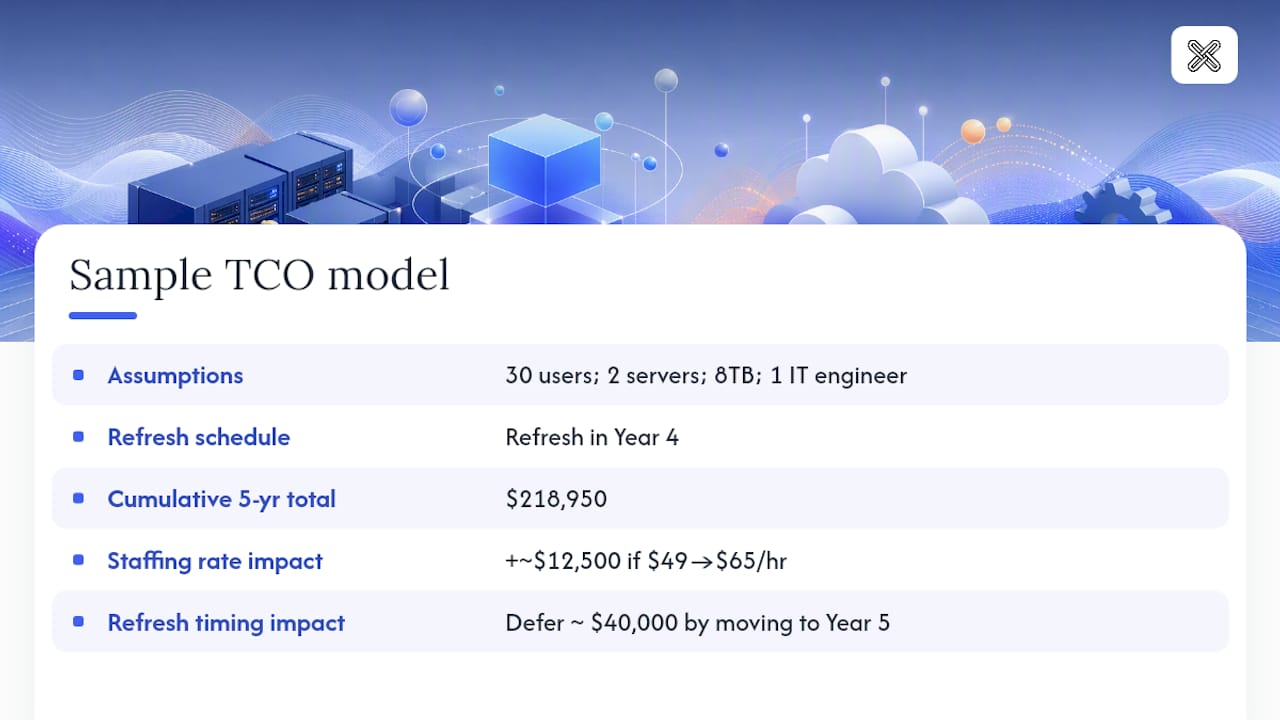
Here's a working model for a 30-user organization running two physical servers, 8TB of usable storage, and a four-year hardware refresh cycle. Adjust the user count, server count, and refresh year to match your own environment, but keep the category structure intact.
Assumptions: 30 users, 2 servers, 8TB storage, one fully loaded IT engineer allocating 6 hours a week to this environment, refresh scheduled for Year 4.
Cumulative five-year total: roughly $218,950.
The staffing line grows modestly each year to reflect raises and added complexity as the environment ages. The refresh year spikes hardware spending again, which is exactly where a cloud comparison would show a flatter, more linear cost curve.
Two variables move the crossover point more than anything else. First, staffing hourly rate. Bump the fully loaded rate from $49 to $65 an hour and the five-year total climbs by roughly $12,500, enough to shift a marginal on-premise decision toward cloud. Second, refresh timing. Stretching the hardware refresh from four years to five defers roughly $40,000 of spending by a full year, which matters if you're comparing against a cloud vendor's annual contract cycle. Accrets' 2026 TCO comparison notes that cloud tends to win the raw five-year number for many mid-market organizations, but the advantage shrinks once egress fees and idle capacity get counted honestly on the cloud side too.
Hidden Costs That Blow Up an On-Premise Budget
The line items in a clean TCO spreadsheet rarely capture everything that actually shows up on an invoice. A vendor-side catalog of on-premise cost categories lists 21 distinct hidden cost areas, and most budgets miss at least a handful of them.
- Unplanned hardware failure. A failed RAID controller or power supply can mean an emergency parts order and rush shipping, often $800 to $3,500 per incident depending on the component and vendor contract terms.
- Patch and upgrade labor. Monthly patching cycles eat real hours even when nothing breaks, and testing patches before deployment adds more.
- Downtime productivity loss. An hour of unplanned downtime for a 30-person team doing document-heavy work can translate into dozens of lost billable or productive hours, not just the direct repair cost.
- Over-licensing. Paying for seats nobody uses is one of the most common and most avoidable line items, and it compounds every renewal cycle.
- Compliance audit expenses. Regulated industries often pay for periodic third-party audits to confirm data handling meets standards, a cost cloud vendors sometimes fold into their service fee.
- Migration and exit costs. Moving off a platform, whether on-premise or cloud, involves data export, validation, and staff retraining that almost never appears in the original purchase budget.
That last point deserves its own line in every model you build. TroopMessenger's TCO breakdown specifically recommends including an exit cost line for both on-premise and cloud comparisons, since the cost of leaving a platform is the one number vendors never volunteer and budgets consistently forget.
How to Build Your Own TCO Model, Step by Step
Building a credible on-premise software cost model doesn't require a finance degree, just a consistent process you repeat every budget cycle.
- Inventory and utilization. List every asset, user count, and I/O pattern. Note which servers are underused and which are near capacity, since that shapes your refresh timeline.
- Gather vendor and facility quotes. Get real numbers for hardware, licensing, and any colocation or facility fees rather than relying on list prices.
- Annualize CapEx. Apply straight-line depreciation over the asset's useful life, typically three to five years for servers and network gear.
- Add OpEx and risk buffers. Include fully loaded staffing, support contracts, and an incident buffer of roughly 5% to 8% of annual OpEx for unplanned repairs.
- Run three scenarios. Model a low, expected, and high case by flexing staffing rate, refresh timing, and support tier to see how sensitive your total is to each variable.
Key inputs worth writing down before you start: your fully loaded engineer rate, your facility's power usage effectiveness (PUE) ratio if you colocate, and the average power draw of your typical server class.
Pro Tip: Run the low and high scenarios before you present anything to finance. A single-number estimate invites pushback; a range with clear drivers behind it earns trust.
Once the model is built, run it against this decision checklist, in priority order:
- How predictable is your workload volume month to month?
- Do you have regulatory or data-residency requirements that favor local control?
- Do you already own depreciated hardware that reduces your CapEx entry point?
- Are your connectivity options limited or unreliable enough that cloud dependency is a risk?
- Does your internal team have the operational capacity to own patching, backups, and incident response?
Industry advisory sources like Gartner consistently note that organizations undercount software shelfware and staffing costs, and recommend modeling across a full three-to-five-year window rather than comparing year-one price tags alone.
Notes on Local-First Document Workflows and License Overhead
Local-first tools remove one specific line item from the security side of your OpEx: the compliance overhead of proving where sensitive documents traveled. When PDF and document comparison happen entirely on local hardware, there's no cloud egress path for a legal contract, patient record, or financial statement to leak through.
That matters for teams juggling per-seat license renewals too. A few practical habits keep license spend under control:
- Audit active seats quarterly and reclaim licenses from departed employees before renewal.
- Standardize on one document toolset across departments instead of letting teams buy redundant point solutions.
- Track deployment through centralized administration rather than per-machine installs, which cuts the labor cost of rollouts.
Local processing doesn't just protect sensitive files. It removes an entire category of audit questions about where your data went, which is often the slowest part of a compliance review.
Guidance on license management best practices covers the deployment side of this in more detail, including how centralized administration reduces the per-seat management burden that otherwise falls on IT staff time.
Choosing Between On-Premise and Cloud Costs
The comparison framework boils down to three questions: what does year one cost, what does year five cost, and how sensitive is each number to your specific usage pattern? On-premise front-loads spending into hardware and implementation, then flattens into a fairly predictable OpEx curve. Cloud spreads cost evenly but stays exposed to consumption-based variables like egress fees, storage growth, and support tier upgrades that can swing a quote significantly year to year.
DataBank's comparison of cost factors points to variable consumption charges and storage retention growth as two of the biggest cloud cost drivers that rarely show up in an initial quote. On the cloud side, industry estimates suggest roughly 30% to 35% of cloud spend can be waste from overprovisioned or unused capacity, which narrows the apparent advantage cloud pricing shows in a simple side-by-side comparison.
The honest framework isn't "cloud versus on-premise" as a binary. It's: model both over the same five-year window, apply the same discipline to hidden costs on each side, and let your workload's predictability decide. Steady, high-volume, already-depreciated environments tend to favor on-premise. Spiky, fast-growing, or short-lived workloads tend to favor cloud.
Three Scenarios Where On-Premise Is the Right Call
Regulated data with strict residency requirements, predictable high-volume workloads that fully use existing hardware, and low-connectivity environments where cloud dependency is a real operational risk. Each scenario shares one trait: the cost of control outweighs the convenience of a subscription. Build the TCO model above, then bring it to finance and operations for a final gut check against your specific numbers.
Get a Practical Path to Lower On-Premise Document Costs
If the line items above made your current software budget look shakier than expected, the licensing side is often the easiest one to fix. Lawtonpdf runs entirely on local hardware, so document merging, comparison, and management don't add a recurring cloud subscription on top of the infrastructure costs you're already carrying.
Legal teams, finance departments, and healthcare organizations use Lawtonpdf specifically because sensitive files never leave the machine they're processed on, which cuts the compliance review time that inflates so many on-premise OpEx lines. The PDF comparison tools handle contract redlines and document audits locally, while centralized license administration keeps per-seat costs visible instead of buried in departmental budgets. If you're evaluating tools to pair with the TCO model you just built, start with the full toolset and see which features map to your document workflow before your next budget cycle closes.
Sources
- Cost of On-Premise vs. Cloud Hosting
- 21 Hidden Costs of Having On-Premise Software
- Cloud vs On-Premise in 2026: The TCO Comparison Your CFO Actually Needs
FAQ
Is cloud actually cheaper than on-premise?
Often for year one and even across five years for mid-market organizations, but the gap narrows once you factor in egress fees, unused cloud capacity, and steady high-volume workloads where on-premise can be cheaper long term.
How much does 2TB of cloud storage cost?
Pricing varies by provider and service tier, but storage is only one line item. A full cloud infrastructure comparable to a small on-premise stack can run $7,200 to $18,000 a year depending on services included.
How much does a SaaS cost?
SaaS pricing typically runs per user per month, with costs scaling directly with headcount rather than requiring the upfront hardware spend on-premise software demands. The total depends heavily on which tier and add-on services you select.
What is on-premise software?
On-premise software runs on hardware you own and control locally rather than on a vendor's cloud servers. Lawtonpdf is one example: all document processing happens on your own Windows machine, with no files sent to an external server.