
To improve document comparison accuracy, preserve document structure before diffing, preprocess with clean OCR and normalization, tune sensitivity and ignore-patterns for the content type, then validate results with golden-file testing. This approach cuts noise from formatting and metadata while catching the edits that actually matter. Legal, finance, healthcare, and research teams that follow it see fewer false positives and higher recall on material changes. LawtonPDF's local comparison engine builds on the same principles.
TL;DR:
- Preserving document structure and comparing matching sections significantly reduces false positives caused by formatting shifts, renumbering, or reordering.
- Preprocessing steps like high-resolution scanning, normalization, and removal of metadata are crucial for minimizing noise and false change detection.
- Element-specific sensitivity tuning for critical clauses and figures improves detection accuracy without impacting performance, especially when combined with chunking and parallel processing.
- Validation using golden files and regular sampling ensures the comparison pipeline maintains accuracy and adapts to document variation.
- Local processing supports secure, multi-format comparisons of confidential files across legal, healthcare, and financial domains without data leaving the device.
Table of Contents
- Why Document Comparisons Go Wrong
- Building a Structure-Aware Comparison Workflow
- Preprocessing Steps That Cut Diff Noise
- How Should You Tune Sensitivity Without Slowing Everything Down?
- Validating Accuracy: QA That Actually Catches Problems
- Local Processing and Multi-Format Support in Practice
- Real Gains From Structure-Aware Techniques
- What Actually Moves the Needle on Accuracy
- Put This Workflow to Work With LawtonPDF
- Sources
- FAQ
Why Document Comparisons Go Wrong
Most inaccurate comparisons fail for the same handful of reasons, and none of them are exotic. If you've ever watched a "redline" flag 200 changes in a contract that barely moved, you already know the feeling.
The biggest offender is formatting noise. A document re-saved from one editor to another shifts line breaks, pagination, and font metadata, none of which changes meaning but all of which can trigger a diff flag. Scanned documents add a second layer of trouble: OCR errors turn a clean "Section 4.2" into "Sedion 4,2," and a naive comparison tool treats that as a substantive edit.
Metadata is a quieter problem. Timestamps, auto-generated document IDs, and invisible characters like non-breaking spaces or smart quotes pile up as phantom differences. Finally, line-based or naive text diffing loses meaning entirely when a paragraph gets reordered instead of edited. The words are identical, the diff says otherwise.
Common noise sources worth flagging before any comparison run:
- Formatting and layout shifts from different software versions or export settings
- OCR misreads on scanned or low-resolution pages
- Metadata artifacts: timestamps, version IDs, embedded revision history
- Invisible characters: non-breaking spaces, smart quotes, zero-width joins
- Naive line-by-line diffing that misses paraphrased or reordered content
Building a Structure-Aware Comparison Workflow
Accuracy improves fastest when you compare like-for-like sections instead of treating a document as one long stream of text. That means preserving hierarchy, retrieving matching sections, and only then running the actual diff.
- Extract structure first. Parse headings, clauses, table boundaries, and section numbers before anything else. This creates a map of the document rather than a flat blob of characters.
- Retrieve the sections that matter. Instead of diffing entire documents line by line, select the analogous sections in each version. Proxy-Pointer style pipelines pair semantically similar sections before comparison, which markedly improves semantic alignment on complex documents where clauses have moved or been renumbered.
- Align and diff per region. Run the comparison within each matched section rather than across the whole file. This keeps a moved clause from generating a wall of false differences.
- Review with severity classification. Present results as visual overlays with changes tagged critical, minor, or structural, so reviewers spend their time on what actually moved the needle.
This is especially valuable for long agreements where related obligations are scattered across sections instead of grouped together, since aggregating scattered clauses that relate to the same concept reads closer to how a human analyst actually works a contract.
Pro Tip: Run the comparison in both directions, version A against B and B against A. Structure-aware pipelines sometimes catch a risk in one direction that gets missed in the other, so a bidirectional check closes that gap.
Preprocessing Steps That Cut Diff Noise
Clean input beats a smarter algorithm almost every time. Before you run a comparison, a short preprocessing pass removes the noise that causes most false positives.
For scanned documents, OCR quality sets the ceiling on everything downstream. Scan at 300 DPI or higher, choose the correct language model for the document's content, deskew pages before extraction, and use zonal OCR on tables or forms so structured data doesn't get flattened into a jumbled text stream.
Normalization matters just as much. Standardize whitespace, punctuation, quote characters, and date or number formats so a "3/4/2026" versus "March 4, 2026" doesn't register as a change. Strip volatile metadata such as timestamps and auto-generated IDs before comparing, and apply ignore patterns, simple regular expressions that exclude version stamps or document IDs, so the ignore rules can remove timestamps, auto-generated IDs, and other repetitive non-substantive tokens before they ever reach a reviewer's queue.
Preprocessing checklist:
- Scan at an appropriate resolution, deskew, and apply zonal OCR to tables and forms
- Normalize whitespace, quote marks, punctuation, and date/number formats
- Strip timestamps, revision IDs, and embedded metadata before diffing
- Apply regex-based ignore patterns for known non-substantive tokens
- Extract text alternatives for embedded objects, or fall back to visual overlays when extraction fails
Statistic Callout: Enterprise documentation on comparison tooling consistently recommends ignore-patterns and disabling formatting checks as the fastest lever for clearer text-level detection, well ahead of tweaking the diff algorithm itself.
How Should You Tune Sensitivity Without Slowing Everything Down?
Sensitivity is the dial that decides how aggressively a tool hunts for differences, and it comes with a real trade-off. Higher sensitivity catches more changes, but it also increases CPU and memory usage, sometimes enough to slow a batch job to a crawl.
The fix isn't to pick one global setting. Use element-specific sensitivity instead:
- High sensitivity for critical clauses, numeric tables, dollar figures, and dosage or dates in healthcare records, where a single character error carries real consequences.
- Medium sensitivity for general prose edits, boilerplate language, and formatting-heavy sections.
- Ignore-patterns and semantic filters for anything that's noise by definition, timestamps, page numbers, watermark text.
Tuning by element type rather than applying one blanket setting delivers better accuracy at a lower performance cost than cranking sensitivity to maximum across the board. When documents are large, mitigate the slowdown with chunking (splitting the file into logical sections before comparing) and parallel processing across those chunks. A practical middle path: run a fast, low-sensitivity pass across the entire document to flag candidate areas, then rerun a high-sensitivity pass only on those flagged regions. You get near-maximum detection without paying the full performance cost everywhere.
Validating Accuracy: QA That Actually Catches Problems
Tuning a comparison pipeline once isn't enough. Documents, formats, and edge cases change, so validation needs to be a repeatable habit, not a one-time setup step.
- Build golden files. Create a small set of representative documents with known, hand-verified differences for each major document type you handle, contracts, financial statements, patient records, research manuscripts. Rerun comparisons against these files whenever you change settings.
- Sample and score. Pull a stratified sample of live comparisons each month, have a reviewer label true and false positives, and calculate simple precision and recall from those labels. You don't need a statistics degree, just a spreadsheet and consistent labeling.
- Track operational KPIs. Reviewer triage time per document and false-positive rate are the two numbers that tell you whether the pipeline is actually saving time or just moving noise downstream.
- Set escalation rules. Define upfront what happens when a diff is ambiguous, who reviews it, what gets logged, and keep an audit trail for compliance-sensitive workflows.
Pairing visual diffs with automated classification, tagging edits by whether they improve, worsen, or neutrally affect a document, helps reviewers decide fast which changes need a second look and which are safe to approve on sight.
Pro Tip: Keep your golden files under version control alongside your comparison settings. When a false-positive rate spikes, you can pinpoint exactly which setting change caused it.
Local Processing and Multi-Format Support in Practice
Accuracy work means nothing if the documents themselves aren't secure. Legal contracts, patient records, and financial statements are exactly the files professionals can't risk uploading to a third-party server for comparison.
LawtonPDF runs its comparison engine locally on Windows, so documents never leave your machine during the diffing process, which matters for firms bound by client confidentiality rules or healthcare organizations working under HIPAA-adjacent data policies. The application supports comparison of multiple file types including PDFs, Word documents, plain text, images, spreadsheets, and folders, which is important because inaccurate comparisons often stem from missed edits in embedded content rather than main body text.
For legal teams building a structure-aware workflow like the one described above, LawtonPDF's legal document comparison guide walks through a practical checklist. Teams that need to keep sensitive files off any server entirely can review the offline comparison approach for a no-upload workflow.
Real Gains From Structure-Aware Techniques
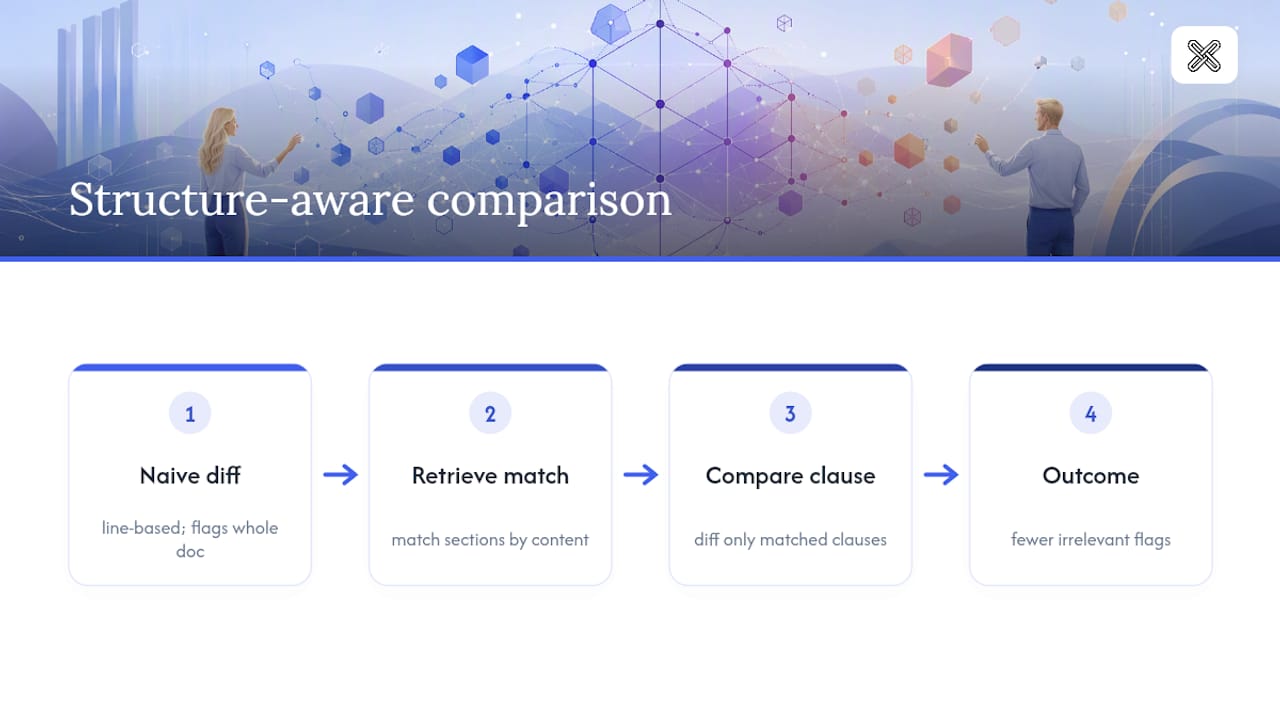
The clearest evidence for structure-aware comparison shows up in long, clause-heavy documents where naive diffing falls apart. A 40-page vendor agreement with renumbered sections is the textbook failure case: a line-based diff flags the entire document as changed because every section shifted down by one number, even though only two clauses actually differ in substance.
Structure-aware retrieval avoids that trap by matching sections on content rather than position. Instead of comparing "Section 4" to "Section 4," it matches the indemnification clause wherever it landed in each version, then diffs the clause itself. Practitioners working with Proxy-Pointer style architectures report that this section-first approach handles dispersed, renumbered clauses far better than approaches that just increase the underlying model's size or complexity.
The same logic holds outside legal work. A financial analyst comparing two quarterly filings cares about changed figures in specific line items, not about the fact that the entire footnote section moved down a page because of a formatting change. A healthcare compliance team comparing policy revisions needs to know that a dosage threshold changed, not that the document was re-paginated. In every one of these cases, the fix is the same: retrieve the matching content first, then compare. Teams that skip that step end up drowning reviewers in irrelevant flags, which is often the real reason "the comparison tool missed something" turns out to be a workflow problem rather than a tool problem.
What Actually Moves the Needle on Accuracy
Most advice on this topic focuses on the wrong lever. Vendors love to talk about smarter algorithms and bigger models, but the research consistently points somewhere more mundane: retrieval quality and preprocessing discipline beat model sophistication almost every time. Preserving the hierarchical breadcrumb of a document, knowing that a clause lives in Section 4.2 under Article IV, matters more for accuracy than whatever detection model sits underneath it.
The conventional wisdom also oversells maximum sensitivity as the safe default. It isn't. Cranking sensitivity to maximum on every document just shifts the burden from missed edits to reviewer fatigue, and fatigued reviewers miss things too. Element-specific tuning, high sensitivity on numbers and clauses, lower on prose, is the more defensible middle path.
If you take one thing from this guide, prioritize preprocessing and structure extraction before you touch sensitivity settings at all. A clean, well-structured input document run through a modest comparison setting will consistently outperform a messy, unnormalized document run through a maximum-sensitivity pass. Fix the input, then tune the dial.
— Lawton
Put This Workflow to Work With LawtonPDF
This workflow can be run without sending a single sensitive file to the cloud. Comparisons process locally on a Windows machine, helping maintain client confidentiality and compliance obligations while providing structure-aware accuracy.

A few ways it maps directly onto what you just read:
- Local processing helps keep privileged legal files, patient records, and financial data off third-party servers.
- Multi-format comparison across various file types allows catching edits that a text-only tool could miss.
- Folder compare enables batch processing of document sets, supporting chunking approaches to comparison.
Start with the PDF comparison tool for contract or report reviews, or check the full document and PDF processing suite if you're comparing across formats regularly. Free tools are available if you want to test the workflow on a smaller file set before rolling it out across a team.
Sources
For deeper technical grounding, review the Proxy-Pointer structure-aware retrieval framework and GroupDocs' sensitivity tuning documentation. LawtonPDF's version control guide covers ongoing QA for compliance teams.
- Proxy-Pointer RAG — Structure-Aware Document Comparison at Enterprise Scale | Towards Data Science
- Customize Document Comparison Java – Complete Guide | GroupDocs API References
FAQ
What Is the Fastest Way to Reduce False Positives?
Strip metadata and apply regex-based ignore-patterns for timestamps and auto-generated IDs before you run any comparison. This single step removes most of the noise that triggers phantom differences.
Does Higher Sensitivity Always Mean Better Accuracy?
No. Higher sensitivity increases detection but also raises CPU and memory demand, and applying it globally often just shifts the burden from missed edits to reviewer fatigue. Element-specific tuning, high sensitivity on tables and clauses, lower on prose, tends to perform better.
How Do I Handle Scanned Documents in a Comparison?
Scan at 300 DPI or higher, deskew the pages, and use zonal OCR on tables or forms so structured data doesn't get flattened into unreadable text before comparison.
Can I Compare Documents Without Uploading Them Anywhere?
Yes. Tools like LawtonPDF process comparisons locally on Windows, so PDFs, Word files, spreadsheets, and folders never leave your machine, which matters for confidential legal or healthcare files.
What's a Golden File and Why Does It Matter for QA?
A golden file is a representative document with hand-verified, known differences that you use to test comparison settings. Rerunning your pipeline against golden files catches accuracy regressions before they reach live review work.